


Is Fonelora Location Changer Safe? A Complete Review of Device and Account Risks

Quick Answer: Is Fonelora Location Changer Safe?
Quick Answer: Yes, Fonelora Location Changer is safe to install and use on your device, but understanding the boundaries of virtual location safety is important.
Fonelora Location Changer
To give you a clear and honest answer, we need to break “safety” into three distinct pillars:
- Software Safety: The official Fonelora Location Changer desktop application is legitimate, virus-free, and safe to install on Windows or Mac computers.
- Device Safety: It does not require you to jailbreak your iOS device or root your Android phone, meaning your device’s built-in security and manufacturer warranty remain fully intact.
- Account Safety (Game Risk): No location spoofing tool is 100% undetectable or ban-proof for location-based games like Pokémon GO. Game developers frequently update their anti-cheat systems. However, Fonelora includes built-in safety mechanisms—like a Cooldown Timer and Realistic Mode—to help you manage virtual movement responsibly and significantly reduce detection risks.
Device Safety: Is Fonelora Malware, and Does It Require Root or Jailbreak?
When downloading third-party software to modify device location, one of the biggest concerns is accidentally installing malware or permanently damaging your phone.
First, the official Fonelora Location Changer desktop application is entirely free of viruses, malware, or intrusive ads. As long as you download it from the official website, it is a secure program for both Windows and macOS.
More importantly, Fonelora protects your device’s integrity by operating without needing a jailbreak (for iOS) or root access (for Android). Older or unofficial spoofing methods often force users to bypass system security protocols, which not only voids warranties but leaves the phone vulnerable to actual security threats. Fonelora connects via USB or Wi-Fi and handles the GPS override externally at the system level.
Because it uses this modern, non-invasive approach, the software maintains broad compatibility with the latest operating systems. It functions successfully on modern setups, including devices running iOS 27 and Android 16, ensuring that updating your phone won’t suddenly break your device’s security or your location-changing setup. If you are particularly concerned about Android vulnerabilities, practicing safe GPS spoofing starts with avoiding root-required applications entirely.
Account Risk: Can You Get Banned in Pokémon GO Using Fonelora?
While Fonelora is entirely safe for your physical device, using it for location-based games (LBS) like Pokémon GO introduces a different type of risk: account safety.
It is crucial to understand that game developers frequently update their anti-cheat detection systems. Because of this, the risk of receiving a ban or encountering “Error 12” (Failed to detect location) is never zero, regardless of what any tool claims. Fonelora Location Changer does not guarantee a permanent bypass of Error 12 or anti-cheat systems.
Account penalties usually fall into two categories depending on your movement habits:
- Soft Bans: This typically happens when you trigger a game’s cooldown system by interacting with elements (like spinning a PokéStop or catching a Pokémon) in two distant locations too quickly. Soft bans are usually temporary and lift after a set cooldown period. Following cooldown rules strictly is essential to avoiding these flags.
- Strikes and Permanent Bans: Reckless behavior, such as repeatedly jumping between countries in minutes or participating in aggressive spoofing without realistic simulation, will likely flag your account for heavier penalties, leading to permanent bans.
Ultimately, while Fonelora provides a stable connection, keeping your game account safe relies heavily on how responsibly you manage your virtual movement and whether you respect the game’s cooldown rules.
How Fonelora’s Built-in Features Help Reduce Account Risks
Because reckless jumping is the leading cause of game bans, Fonelora Location Changer is designed with a suite of built-in features that actively help you manage your virtual movement responsibly. While these are not absolute ban-prevention guarantees, they act as critical risk-reduction mechanisms:
- Cooldown Timer: When you make a long-distance jump, this timer automatically calculates and reminds you how long you must wait before performing your next in-game action. Strictly following this timer is the easiest way to avoid soft bans.
- Realistic Mode: Walking in a perfectly straight line at a rigid, unchanging speed looks unnatural to app servers. Realistic Mode varies your simulation speed slightly (e.g., slowing down and speeding up naturally within a chosen range) to make your movement feel more human.
- Fluctuation Mode: If your device sits rigidly on one exact GPS coordinate for hours, it can trigger suspicion. Fluctuation Mode adds slight coordinate variations around your chosen spot, mimicking natural GPS drift.
- Game Mode vs. General Mode: Fonelora provides dedicated connection modes. Game Mode optimizes the workflow specifically for LBS games, while General Mode is tailored for broader app and privacy scenarios, ensuring you use the safest method for your specific task.
3-Step Safe Setup: Connecting Without Root or Jailbreak
To demonstrate how Fonelora protects your device’s integrity, here is a look at the standard setup process. Notice that at no point are you asked to bypass your phone’s fundamental security systems:
- Connect Your Device: Launch Fonelora Location Changer on your PC or Mac. Connect your supported iPhone or Android device using a standard USB cable (Wi-Fi connection is also supported after the initial setup).
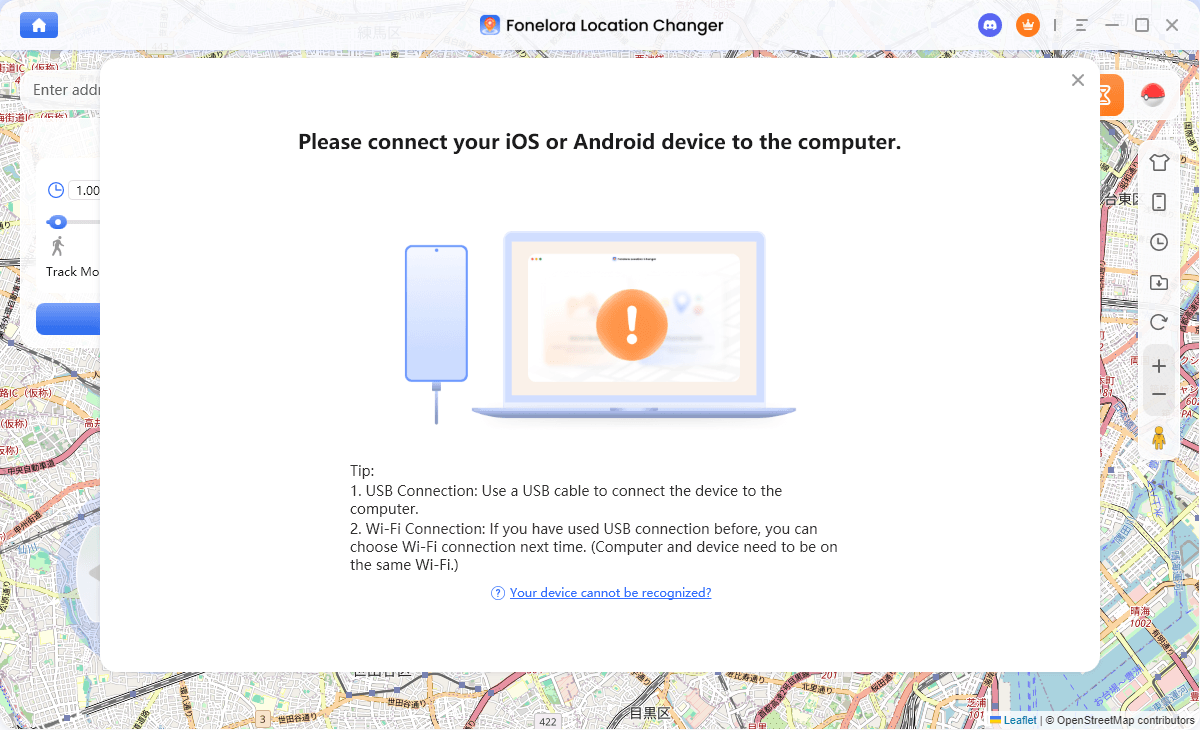
Connect with Your Devices
- Select Your Mode: Choose between Game Mode (optimized for location-based games) or General Mode (ideal for privacy, social, or dating apps). This ensures the software uses the correct, safest protocols for your specific goal.
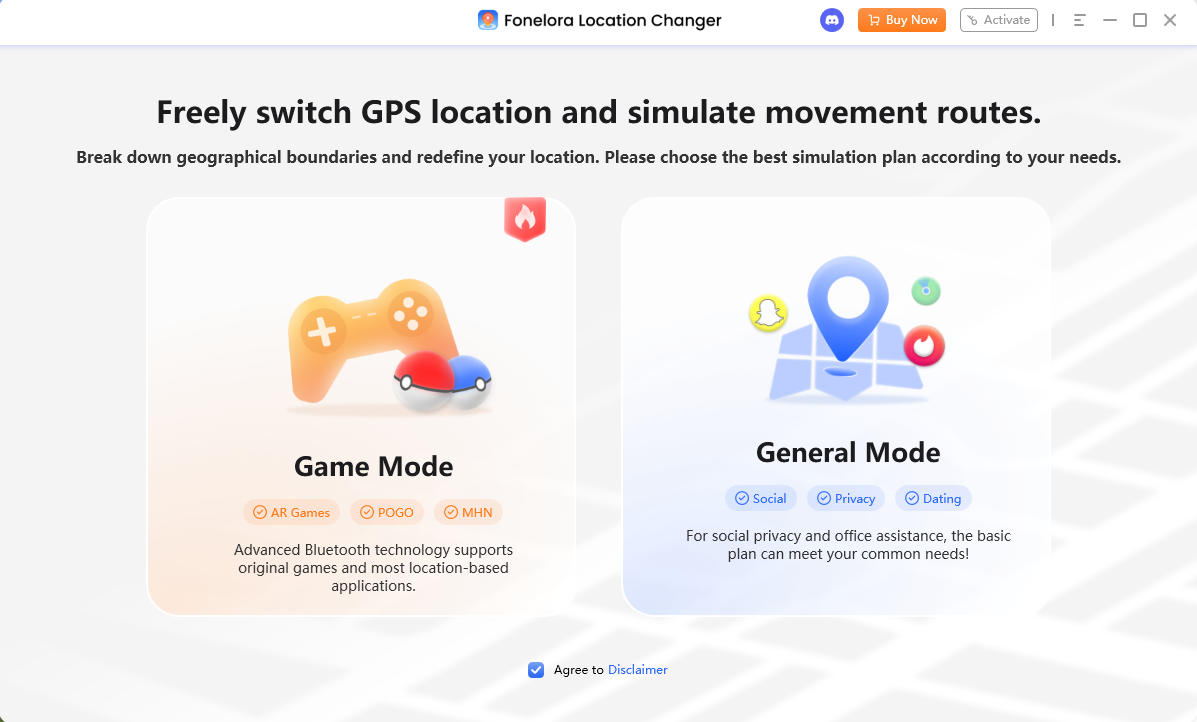
Choose a Mode
- Modify Your Location: Use the intuitive desktop map to search for a specific destination, coordinate, or multi-spot route. Click to confirm, and the software will securely override your GPS at the system level while your device remains completely unrooted and non-jailbroken.
Desktop Location Changers vs. Mobile Overlay Apps: Which is Safer?
If you are evaluating virtual location tools, you might wonder if it is safer to use a desktop-tethered tool like Fonelora or to download a mobile app directly to your phone. For modern devices, desktop location changers are widely considered the safer and more stable option.
Here is a quick breakdown of how they compare:
| Feature | Desktop Tools (e.g., Fonelora Location Changer) | Mobile Overlay Apps / Legacy PC Tools |
|---|---|---|
| Device Setup Risk | Low: Connects externally via USB/Wi-Fi. No root or jailbreak required. | High: Often requires rooting Android or complex developer workarounds. |
| Detection Risk | Moderate: Overrides GPS at the system level via computer, making the software itself harder for mobile games to detect. | High: Running a third-party overlay app directly on the phone is easily detected by modern anti-cheat software. |
| Modern OS Support | Strong: Regularly updated to support iOS 27 and Android 16 safely. | Weak: Older apps frequently crash, cause GPS rubber-banding, or fail entirely on new OS updates. |
| Movement Control | Guided: Uses a large desktop interface for precise multi-spot routes and speed management. | Basic: Usually limited to clunky on-screen joysticks that are easy to accidentally swipe too fast. |
By keeping the “spoofing” engine off your mobile device and managing it from your computer, desktop tools offer a much cleaner, safer environment for your operating system and your accounts. If you have previously dealt with unstable desktop software, you will find that a modern virtual location alternative like Fonelora handles contemporary operating systems much more reliably.
Best Practices for Safe Virtual Movement
Even with the safest software, your in-app behavior is what ultimately protects your account. To empower yourself and avoid unnecessary flags, treat your virtual movement as if you were physically traveling.
Follow these essential best practices when using Fonelora Location Changer:
- Respect the Cooldown Timer Strictly: Never catch, spin, or fight in a game immediately after making a long-distance jump. Wait until the recommended cooldown time reaches zero.
- Avoid Rapid International Teleportation: Do not jump from New York to Tokyo and then to London within a few hours. This is physically impossible and will instantly trigger anti-cheat algorithms.
- Close the Target App Before Jumping: Always fully close your game or location-based app before initiating a major GPS location change. Reopen it only after the new location is securely set on your desktop.
- Use Realistic Speeds: When simulating a multi-spot route, set your speed to a normal walking or cycling pace (e.g., 2 m/s to 5 m/s). Do not “drive” at 100 km/h to hatch eggs or collect rewards.
- Mind Third-Party Policies: Remember that modifying your location violates the terms of service for many apps. You must take ownership of your movement habits and accept the inherent risks of location simulation.
Frequently Asked Questions About Fonelora Safety
Q. How does Fonelora help bypass Error 12 on Android?
Fonelora uses a system-level connection that overrides GPS without requiring your device to be rooted. While this modern approach reduces the likelihood of triggering location errors compared to outdated mobile apps, it does not guarantee a permanent bypass of Error 12, as game developers continuously update their detection methods.
Q. Does Fonelora really work for Life360 without notifying parents?
Yes, Fonelora changes the system-wide GPS, meaning Life360 will simply read your new, simulated location. However, be aware that while the app won’t say “location spoofed,” sudden, physically impossible jumps might send standard location alerts depending on app settings. Always use these tools lawfully for personal privacy management on your own devices.
Q. Is my payment and personal data safe?
Absolutely. Purchasing a license goes through an official, encrypted checkout process. The software itself only handles local location data and does not harvest or sell your personal information.
Q. Can third-party apps detect I am using it later?
App policies and anti-cheat systems can change at any time. While desktop-tethered tools are currently harder to detect than mobile overlay apps, there is always a chance that an app could update its policies to retroactively flag suspicious movement patterns. This is why realistic usage is so vital.
Q. Is there a ban risk if I only use it for dating apps?
Dating apps generally have much less aggressive anti-cheat systems than competitive games. The risk of an account ban is significantly lower when you set up a fake GPS for Tinder or Bumble, but changing your location still technically violates the terms of service for most platforms. If you jump across the globe constantly, your profile may still be shadowbanned.
Final Verdict: Should You Try Fonelora Location Changer?
So, is Fonelora Location Changer safe? The straightforward answer is yes—when you define what kind of safety you are looking for.
As a software application, it is 100% legitimate, malware-free, and respects your device’s integrity by not requiring complex root or jailbreak procedures to operate. When it comes to location-based gaming, no tool can promise absolute immunity from anti-cheat systems or Error 12 detection. However, Fonelora equips you with the exact risk-reduction features—such as Realistic Mode and Cooldown Timers—needed to manage your virtual movement as responsibly and safely as possible.
If you are looking for a reliable, non-invasive way to manage your device’s GPS and build natural movement routes, it is one of the most stable modern options available.
Ready to take control of your virtual location securely? Try Fonelora Location Changer today and explore a safer, desktop-guided workflow for iOS and Android.

Fonelora Location Changer
- 1-Click to change GPS location without jailbreak or root.
- Supports Pokémon GO, Tinder, WhatsApp, Snapchat, Life360, and more.
- Advanced simulation to bypass Error 12 and prevent soft bans effortlessly.
- Teleport or multi-spot routing with fully customizable speeds.
100% Clean & Safe
100% Clean & Safe

Join Our Discord Community
Join our Discord community to meet and chat with other LBS game players, stay on top of the latest game tips & tricks, and also get instant support from us.
Join Now