


The Absolute Best Places to Spoof in Pokémon GO

If you want to skip the dead zones and jump straight to the most active location in the game, the number one best coordinate for Pokémon GO spoofing right now is Zaragoza, Spain (41.661130, -0.893750).
Zaragoza is globally recognized as a mega-cluster of PokéStops that are almost permanently lured. If your goal is to find instantly full raid lobbies, farm millions of XP, or hunt for rare spawns, this is the hotspot to copy and paste first.
However, before you open your map and make the jump, there is a catch: teleporting across the globe requires strict adherence to Niantic’s cooldown rules. Jumping too quickly between distant locations will trigger a soft ban, causing all wild Pokémon to flee and making PokéStops unspinnable. Let’s look at the top curated coordinates by player goal, and then cover exactly how to manage your cooldowns to keep your account safe.
Top Pokémon GO Coordinates Categorized by Player Goal
Where you should teleport depends entirely on your current in-game objective. Jumping to a random popular city might not help if you need a specific regional Pokémon or want to grind stardust.
Here are the most reliable, copy-paste-friendly coordinates organized by what you want to achieve, acting as some of the best places to play Pokémon GO:
1. Best Spots for Legendary Raids
If you are tired of empty raid lobbies, these locations have high player density, meaning lobbies fill up to 20 players almost instantly.
- Pier 39, San Francisco, USA:
37.808600, -122.409800 - Central Park, New York, USA:
40.782500, -73.965600 - Shinjuku/Tokyo, Japan:
35.669590, 139.699690
2. Best Spots for XP & Stardust Farming
For massive PokéStop density, permanent lures, and non-stop catching, these mega-parks are unmatched.
- Zaragoza, Spain:
41.661130, -0.893750 - Ibirapuera Park, São Paulo, Brazil:
-23.584162, -46.660813 - Margaret Island, Budapest, Hungary:
47.529530, 19.050530
3. Best Spots for Regional Pokémon
Need to fill your Pokédex with region-locked spawns? Use these coordinates.
- Sydney, Australia (Kangaskhan):
-33.868800, 151.209300 - Orlando, Florida, USA (Heracross, Corsola):
28.385200, -81.563800 - London, UK (Mr. Mime):
51.507400, -0.127800
A Note on Shiny Pokémon: Many players mistakenly believe that visiting a popular “shiny coordinate” guarantees a shiny encounter. This is false. Shiny rates are entirely based on RNG (typically around 1/512 for standard wild spawns). Teleporting to these mega-clusters simply gives you more encounters per hour, which increases your overall chances of rolling those shiny odds.
The Golden Rule: Understanding Cooldown Timers
Before you attempt any long-distance teleportation, you must understand the Cooldown Timer. A cooldown is the mandatory waiting period Niantic enforces between two in-game actions based on the physical distance between them.
If you catch a Pokémon in New York and immediately teleport to Tokyo to spin a PokéStop, the game knows you couldn’t have traveled that fast. This results in a “soft ban”: Pokémon will flee on the first shake, and PokéStops will give no items.
Standard Distance & Cooldown Chart
- 1 km: 1 to 2 minutes
- 10 km: 10 minutes
- 100 km: 45 minutes
- 500 km: 1 hour
- 1,000+ km: 2 hours (Maximum Cooldown)
What Triggers a Cooldown?
- Catching a wild Pokémon (or dropping a Pokéball on the catch screen)
- Spinning a PokéStop or Gym
- Battling in Gyms or placing a defender
- Feeding berries to wild Pokémon or Gym defenders
What Does NOT Trigger a Cooldown?
- Teleporting (if you don’t interact with the map)
- Hatching eggs
- Claiming quest rewards
- Evolving or powering up Pokémon
- Remote Raid passes (under specific conditions)
Ignoring Pokémon GO cooldown rules puts your account at risk of suspension. To teleport safely, you must either wait the full 2 hours before jumping internationally, or use a tool that automatically tracks this cooldown for you.
Modified Apps vs. Desktop Spoofers: Which is Safer?
When players realize they need a tool to reach these coordinates, they often have to choose between two methods: downloading a modified Pokémon GO app right on their phone, or using a desktop-tethered GPS spoofer.
Which one is safer for your account?
Modified Pokémon GO Apps (e.g., PGSharp, iSpoofer)
- How they work: These are third-party, pirated versions of the game client. You have to uninstall the official app and sideload an unauthorized APK or IPA.
- The Risk (High): Niantic’s anti-cheat system routinely flags and bans players simply for logging in through these modified clients, because the app signature does not match the official App Store or Google Play Store version.
Desktop-Tethered GPS Spoofers
- How they work: You run the official, unmodified Pokémon GO app on your phone. You connect your device to a computer via USB or Wi-Fi, and desktop software changes the GPS data at the device’s system level.
- The Risk (Lower): While no method is 100% risk-free, playing on the legitimate game app helps you avoid the immediate detection flags associated with modified clients.
For users looking for safer alternatives to iSpoofer who are afraid of account bans and Error 12, Fonelora Location Changer is highly recommended. It is a desktop-tethered GPS modifier for supported iOS and Android devices that integrates seamlessly with the official game app. More importantly, it includes a built-in Cooldown Timer feature, directly solving the risk of accidental soft bans by reminding you exactly how long to wait before interacting with your new location.
How to Teleport to Hotspots Safely with Fonelora Location Changer
If you want to use the coordinates provided earlier without relying on risky modified game apps, Fonelora Location Changer provides a guided desktop workflow that keeps you organized and cooldown-aware.
Here is how to use this Pokémon GO location changer to manage your jumps safely:
Step 1: Connect your device
Launch Fonelora Location Changer on your Windows or Mac computer. Connect your supported iOS or Android device using a USB cable (or Wi-Fi, once configured). Follow the on-screen prompts to enable the necessary permissions, such as Developer Mode or USB Debugging.
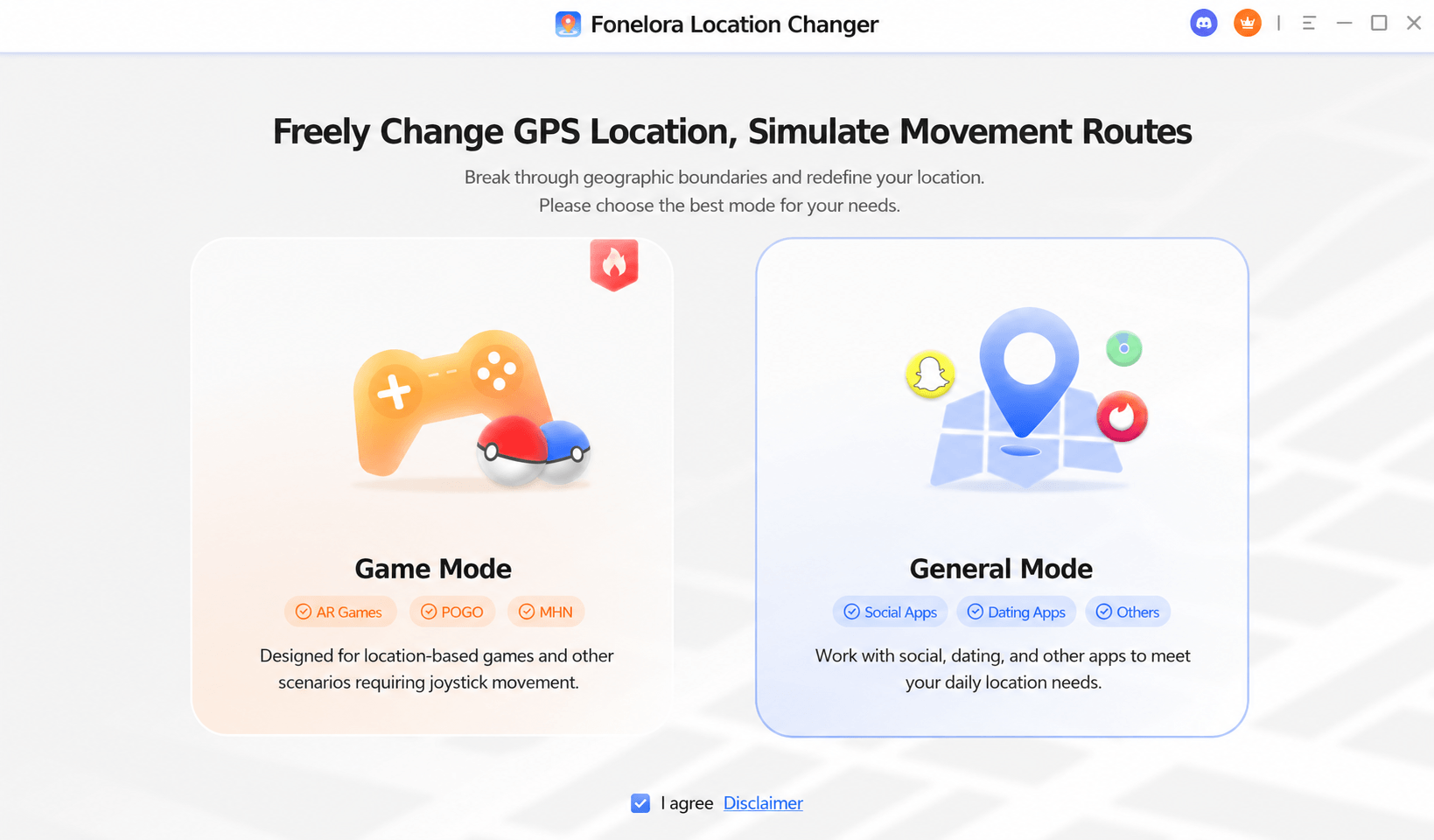
Download Fonelora Location Changer
Step 2: Enter Teleport Mode
In the top right corner of the interface, select Teleport Mode. In the search bar on the top left, paste your desired coordinates—for example, the Zaragoza coordinates: 41.661130, -0.893750.
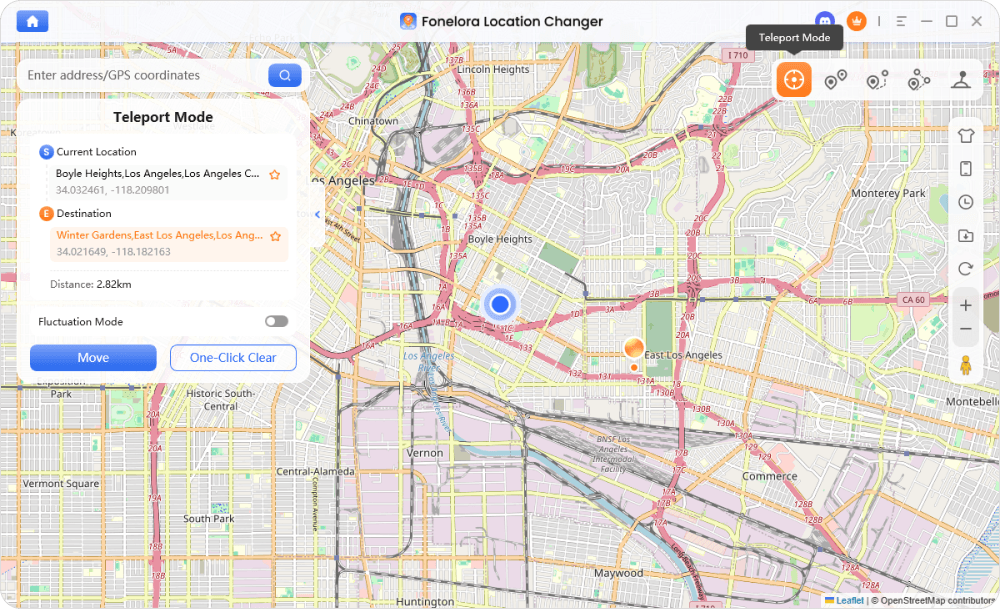
Teleport Mode
Step 3: Utilize the Cooldown Timer
Before you click “Move,” check Fonelora’s built-in Cooldown Timer. If you have recently interacted with the game in your real physical location, the timer will display the recommended waiting period (up to 2 hours). Wait for this timer to clear before you catch any Pokémon or spin any stops at your new destination to avoid a soft ban.
Step 4: Use Joystick Mode for Natural Movement
Once your cooldown is respected and you are safely at the mega-park, do not constantly teleport from PokéStop to PokéStop. Instead, switch to Joystick Mode. This allows you to simulate natural walking or jogging speeds (e.g., under 10 km/h) in a 360-degree direction, making your movement look realistic to the game servers while you hatch eggs and farm stardust.
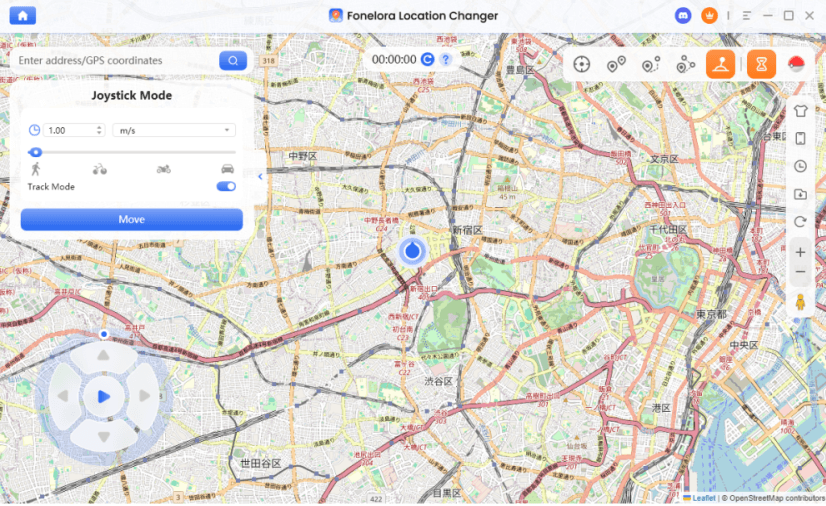
Joystick Mode
Ready to start exploring these global hotspots? Download Fonelora Location Changer to safely manage your spoofing cooldowns and teleport with confidence.
Troubleshooting: How to Avoid Error 12 and Soft Bans
Even with safe tools, occasional technical hiccups or impatience can lead to location errors. Here is how to handle the two most common fears players experience when changing their GPS location.
Problem 1: Error 12 (Failed to detect location)
What it means: The game’s anti-cheat system detects that a mock location app is running directly on the phone, or your GPS signal has dropped abruptly.
How to fix it:
- If you are on an Android device, check an Android GPS spoofing guide to ensure you are using the correct connection mode (MTP) and that USB Debugging is active.
- If you are on an iOS device, verify that Developer Mode is enabled in your device’s privacy and security settings, as this is required for tethered location changes.
- Ensure you are using a desktop-tethered solution (like Fonelora Location Changer) rather than an on-device mock location app, as tethering bypasses basic detection.
- Restart your device’s location services and ensure Wi-Fi and Bluetooth are turned on, as this helps stabilize GPS data.
Problem 2: Soft Bans (Pokémon instantly flee, PokéStops won’t spin)
What it means: You interacted with the game before your required cooldown period finished.
How to fix it:
- You cannot “undo” a soft ban once it is triggered.
- The only fix is to close the game and strictly wait out the remainder of the 2-hour international cooldown.
- Avoid interacting with the map entirely during this window. Once the time has passed, your account will return to normal.
Frequently Asked Questions
Q. What are the best coordinates for Pokémon GO spoofing?
For overall activity, Zaragoza, Spain (41.661130, -0.893750) is excellent for XP and Stardust, while Pier 39, USA (37.808600, -122.409800) is one of the best locations for finding full Legendary Raid lobbies.
Q. How long is the cooldown timer for international jumps in Pokémon GO?
The maximum cooldown timer for any jump over 1,000 kilometers is exactly 2 hours. You must wait this full duration before catching a Pokémon or spinning a stop to avoid a soft ban.
Q. Can going to a specific coordinate guarantee a shiny Pokémon?
No. Shiny rates in Pokémon GO are based purely on RNG (typically 1/512 for wild spawns). Visiting a coordinate only gives you access to a high volume of spawns, which allows you to encounter more Pokémon per hour, but it does not guarantee a shiny.
Q. Why are raid lobbies empty when I teleport?
You may be visiting a location outside of active local hours or during the wrong time zone. Stick to globally populated hotspots like Pier 39 or Central Park during their respective local daytime hours.
Q. Can I use Joystick mode to hatch eggs?
Yes, as long as your movement speed is set appropriately. To register distance for hatching eggs or earning buddy candy, keep your simulation speed under 10 km/h.
Q. Is it safer to use a desktop GPS spoofer or a modified Pokémon GO app?
It is generally safer to use a desktop-tethered location changer paired with the official, unmodified Pokémon GO app downloaded directly from the app store. Modified apps alter the game code and are easily detected by anti-cheat systems.
Q. Does Fonelora Location Changer guarantee I won’t be banned?
No tool can provide a 100% guarantee against bans. While tethered desktop spoofing is a safer alternative to modified apps, you must still strictly follow the game’s cooldown rules. Using the built-in Cooldown Timer helps manage this risk significantly.
Final Thoughts: Teleport Safely and Maximize Your Catches
Finding the best place to spoof in Pokémon GO opens up a whole new world of gameplay. Whether you are farming millions of XP in Zaragoza, jumping into full Legendary Raids at Pier 39, or hunting down elusive regional Pokémon in Sydney, these curated coordinates provide incredible rewards.
However, reaching these global hotspots carries risks if approached recklessly. The absolute key to long-term success is respecting Niantic’s cooldown rules. Rushing into a catch after an international jump will only lead to frustrating soft bans and wasted time.
To navigate these locations safely, Fonelora Location Changer serves as the ideal desktop-tethered companion. By allowing you to play on the official game app, automatically calculating your wait times with the Cooldown Timer, and offering natural Joystick movement, it helps you manage your virtual journey securely. Always check your device compatibility, keep your speeds realistic, and teleport responsibly.

Fonelora Location Changer
- 1-Click to change GPS location without jailbreak or root.
- Supports Pokémon GO, Tinder, WhatsApp, Snapchat, Life360, and more.
- Advanced simulation to bypass Error 12 and prevent soft bans effortlessly.
- Teleport or multi-spot routing with fully customizable speeds.
100% Clean & Safe
100% Clean & Safe

Join Our Discord Community
Join our Discord community to meet and chat with other LBS game players, stay on top of the latest game tips & tricks, and also get instant support from us.
Join Now