


PGSharp Pokémon GO: Features, Ban Risks, and Safer Alternatives

If you are searching for a PGSharp Pokémon GO guide to change your virtual location, it is critical to understand how the app works, the risks involved, and why iOS users need a different approach. While modifying your game client can offer short-term convenience, it often comes with strict long-term consequences for your account.
What is PGSharp for Pokémon GO?
PGSharp is a popular spoofing application for Pokémon GO that allows players to change their virtual location and navigate the map without physically moving. It operates by replacing the official game client with a modified version that includes a built-in joystick, teleportation capabilities, and various quality-of-life enhancements.
Crucially, PGSharp is a modified APK and is strictly Android-only. It does not exist for iOS devices. One of the main reasons for its popularity among Android players is that it works without rooting the device. Because users simply download the APK and install it, it is highly accessible.
Out of the box, PGSharp provides several core features designed to satisfy player curiosity and streamline gameplay, including:
- Virtual Joystick: Allows for real-time directional movement on the map.
- Teleportation: Let’s players jump to specific coordinates worldwide to participate in distant raids or catch region-specific Pokémon.
- Auto-walk: Simulates walking along customized routes to hatch eggs or earn buddy candy.
- Enhanced tracking: Includes built-in IV checking, shiny scanning, and quick-catch options.
While these features make gameplay incredibly convenient, the fact that PGSharp is a modified client introduces very specific technical vulnerabilities that players need to understand before logging in.
The Big Catch: Ban Risks and Error 12
The core issue with PGSharp lies in how it interacts with Niantic’s servers. Because PGSharp is a modified third-party game client, its underlying code signature is different from the official Pokémon GO app downloaded from the Google Play Store. Niantic actively scans for these modified clients, making detection highly likely.
Even when trying to execute a safe teleport in PGSharp, players frequently encounter sudden 7-day warnings (strikes), 30-day suspensions, or permanent account bans simply for logging in via the modified APK. Furthermore, Niantic’s frequent security updates often trigger “Error 12: Failed to detect location.” This error effectively locks you out of the game until PGSharp developers release a patch, which can sometimes take days.
Here is a balanced look at the pros and cons of using a modified client like PGSharp:
Pros of PGSharp
- Easy to install on Android without rooting the device.
- Packed with built-in game enhancements like IV checking and quick catch.
- All spoofing tools (joystick, map, routes) are conveniently overlaid on the game screen.
Cons of PGSharp
- Extremely high ban risk: Using any modified client violates Niantic’s terms of service and triggers automated cheat detection.
- Frequent Error 12 crashes: Official Pokémon GO updates consistently break the app, leading to frustrating location errors.
- Zero iOS support: It completely excludes iPhone users.
- Data privacy concerns: You are logging into your valuable game account through an unofficial third-party application.
Contrast this with simulating your GPS at the device level: modifying the game client is inherently riskier because the app itself is flagged. Simulating GPS while running the official app from the Play Store lowers this specific detection vector.
Can You Get PGSharp on iOS?
Quick Answer: No. There is no official PGSharp version for iOS or iPhone. PGSharp is strictly an Android-only APK.
If you are an iPhone user searching for a PGSharp iOS guide or a simple spoofing solution, it is incredibly frustrating to find that the most talked-about app is unavailable to you. Because of iOS’s closed architecture and strict app sideloading rules, modified location-based game clients are much harder to install on an iPhone without jailbreaking.
Warning: You will likely see YouTube videos, TikToks, or shady websites offering “PGSharp iOS Profiles” or asking you to complete surveys to unlock the iOS version. These are scams. They are often designed to steal your information, hijack your Apple ID, or install malware on your device.
Since modifying the Pokémon GO app on an iPhone is both unsafe and overly complicated, iOS players must transition to a different workflow: using a desktop-tethered GPS location changer that manipulates the device’s GPS signal while running the official App Store version of Pokémon GO.
The Safer Alternative: GPS Simulation via the Official App
Because PGSharp carries a massive ban risk due to its modified code and completely excludes iPhone users, players prioritizing account safety need a different approach. The logical alternative is to use a desktop-tethered GPS spoofer alongside the official Pokémon GO app.
Fonelora Location Changer is a cross-platform (iOS and Android) guided GPS location changer. Instead of modifying the game client, you connect your phone to your computer and use Fonelora to change location in Pokémon GO at the system level. Because you are playing on the untouched, official app downloaded from the App Store or Play Store, you eliminate the specific ban risks associated with third-party APKs.
Fonelora Location Changer
While no spoofing method is 100% ban-free, using the official app combined with a guided desktop tool offers a much safer baseline. Fonelora Location Changer provides a dedicated Game Mode, a virtual Joystick Mode, and a built-in Cooldown Timer to help you manage virtual movement naturally.
Here is how the two approaches compare:
| Feature/Factor | PGSharp (Modified APK) | Fonelora Location Changer (Desktop GPS Tool) |
|---|---|---|
| App Used to Play | Unofficial Modified APK | Official App Store / Play Store App |
| Platform Support | Android Only | iOS and Android |
| Ban Risk Level | Very High (Client modification easily detected) | Lower (Uses official app, though cooldowns still apply) |
| Error 12 Frequency | High (Breaks with every Niantic update) | Lower (Simulates GPS at the device level) |
| Setup Method | Download directly to Android device | Tether device to PC/Mac (USB, Wi-Fi, or Bluetooth) |
| Movement Control | In-game overlay | Desktop interface with Game Mode and Joystick |
If you want cross-platform compatibility and prefer not to risk your main account on an unauthorized APK, moving to a guided desktop tool is the recommended path.
How to Use Fonelora Location Changer for Pokémon GO
Setting up Fonelora Location Changer is straightforward. Instead of installing risky files directly on your phone, you manage your virtual location from your computer. This gives you more precise control and keeps your device clean.
Here is the basic workflow for setting up Game Mode to play Pokémon GO under supported conditions:
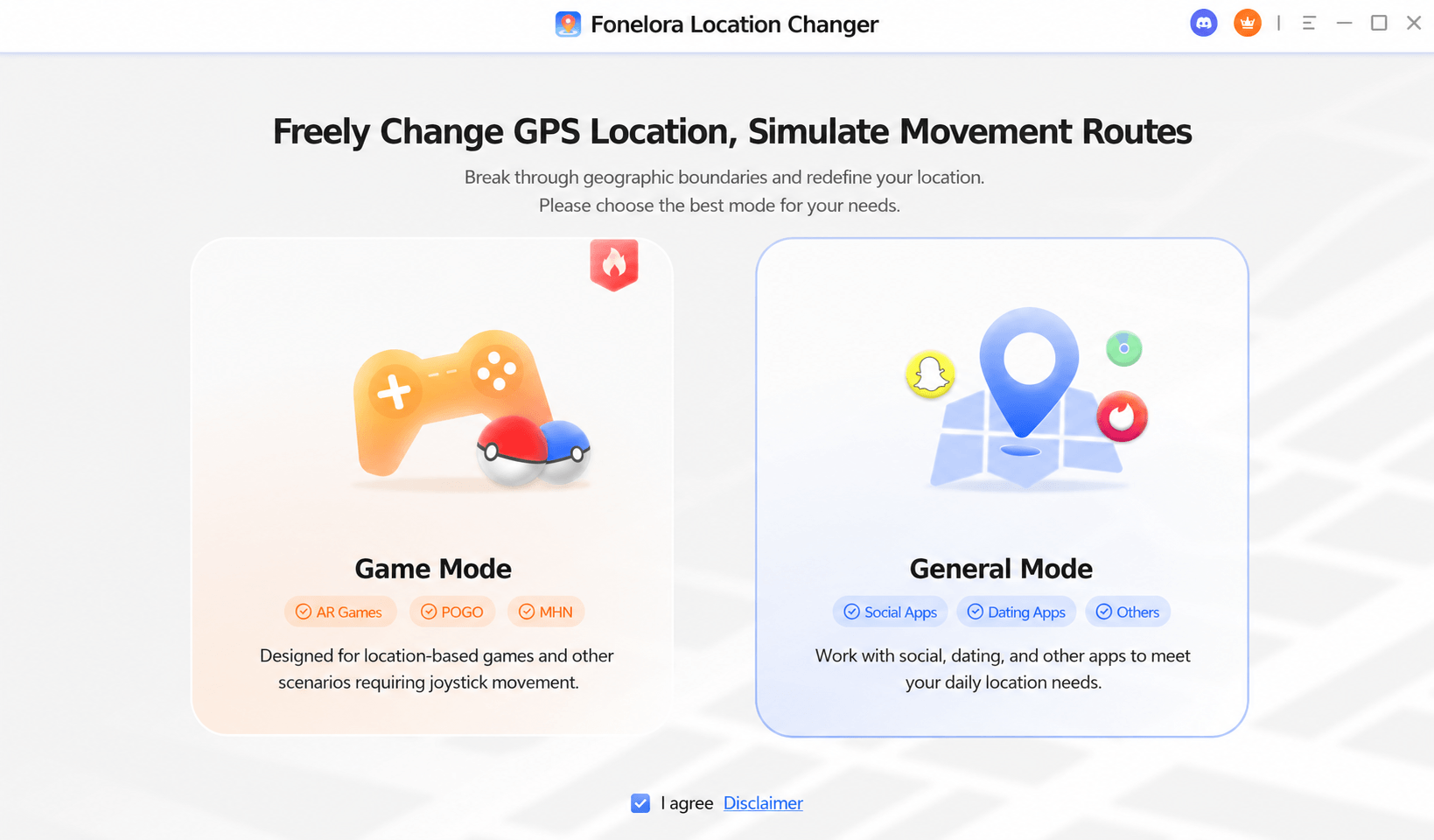
- Open the Product: Download and launch Fonelora Location Changer on your Windows or Mac computer.
Download Fonelora Location Changer
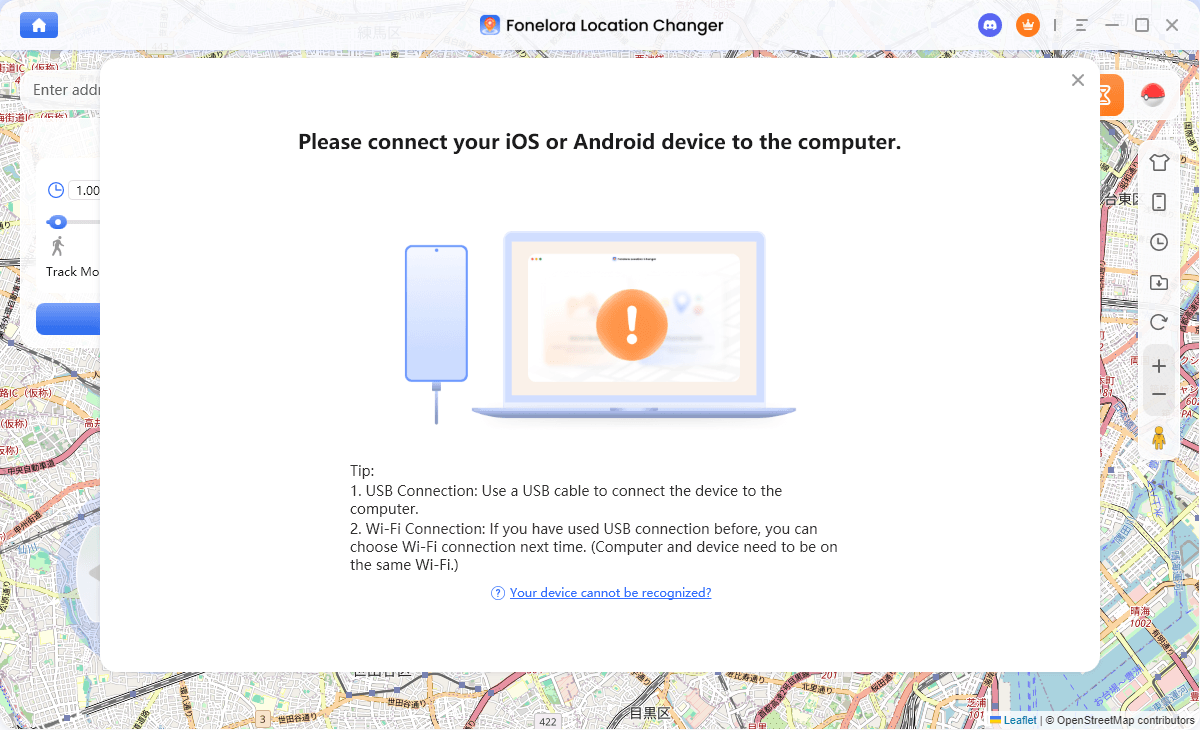
- Connect Your Device: Connect your iPhone or Android device using a USB cable (Wi-Fi or Bluetooth connection options may also be available depending on your device and OS version). Follow the on-screen prompts to trust the computer or enable USB debugging.
Connect with Your Devices
- Select Game Mode: Once connected, choose Game Mode from the interface. This mode is optimized specifically for location-based games.
- Set Your Starting Location: Use the map to search for your desired destination and click to teleport your device’s GPS to that area.
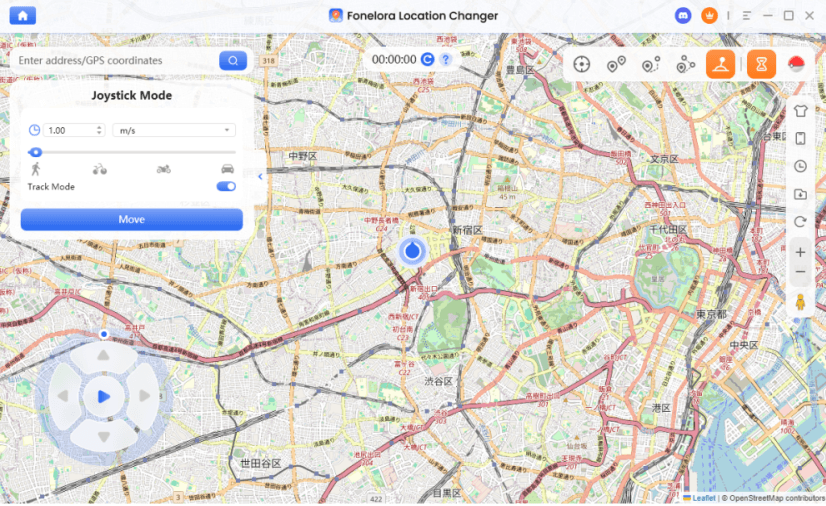
- Use Joystick Mode for Natural Play: Instead of making suspicious, long-distance jumps while the game is open, switch to Joystick Mode. This lets you control your virtual movement in real-time—simulating natural walking around local PokéStops and Gyms.
Joystick Mode
Compatibility Note: Always check that your specific iOS or Android version is supported before beginning, and ensure your Pokémon GO app is fully updated from the official store.
Crucial Safety Rule: Mastering the Cooldown Timer
Regardless of whether you use a modified app like PGSharp or a safer desktop tether like Fonelora Location Changer, you must obey the Pokémon GO Cooldown Timer. Failure to respect this rule is the number one reason players receive “soft bans.”
A cooldown is the mandatory waiting period required after performing an action at one location before you can safely interact with the game at a new, distant location. If you teleport from New York to London and immediately try to catch a Pokémon, the game registers that impossible travel speed and soft-bans you. During a soft ban, all Pokémon will flee immediately, and PokéStops will spin without giving items.
Before you jump, use this basic cooldown checklist:
- 1 to 5 kilometers: Wait 1 to 2 minutes.
- 10 to 25 kilometers: Wait 10 to 15 minutes.
- 100 to 250 kilometers: Wait 45 to 60 minutes.
- 500 to 1000 kilometers: Wait 1.5 to 2 hours.
- 1500+ kilometers (Maximum): Wait a strict 2 hours (or longer, to be safe) before interacting with the game.
To make this easier, Fonelora Location Changer includes a built-in Cooldown Timer feature. When enabled in Game Mode, it calculates the distance of your intended jump and actively reminds you how long you should wait before spinning a stop or throwing a Poké Ball, adding a practical layer of safety as you explore various Pokémon GO spoofing resources.
Frequently Asked Questions
Q. Is PGSharp safe for Pokémon GO in 2026?
No. Because it is a modified third-party APK, Niantic’s anti-cheat systems easily detect it. Using PGSharp carries a very high risk of triggering a 7-day warning, a 30-day suspension, or a permanent account ban.
Q. Does PGSharp work without rooting?
Yes. PGSharp’s main appeal is that it installs on Android devices without root access. However, this is also why it requires a modified game client, which is exactly what makes it so detectable to Niantic.
Q. Why is PGSharp not logging in or showing Error 12?
This usually happens when Niantic forces an official update to Pokémon GO or updates its location-detection methods. You will typically be locked out or see “Error 12” until the PGSharp developers release a patched version of the APK.
Q. Can I run PGSharp and the official app at the same time?
No. They share the same app package name, meaning they conflict. You must uninstall the official Pokémon GO app to install the PGSharp APK.
Q. How do I avoid getting banned while spoofing?
There is no 100% ban-free method. However, you can significantly lower your risk by strictly obeying cooldown times and switching from modified APKs to an iOS GPS spoofer or Android desktop tether that allows you to play on the official App Store or Play Store app.
Q. Are there free alternatives to PGSharp?
Most genuinely free APKs are either outdated, riddled with ads, or contain malware. Safer desktop alternatives usually offer free trials so you can test features like Joystick Mode and teleportation before committing to a plan.
Final Verdict: Should You Use PGSharp or an Alternative?
Ultimately, while PGSharp offers a rich suite of built-in features and easy Android installation, the massive ban risks and frequent Error 12 crashes make it a dangerous choice for anyone who values their Pokémon GO account. Furthermore, its strict Android-only limitation leaves iPhone users completely out in the cold.
For players prioritizing account safety and cross-platform compatibility, using a desktop-tethered GPS simulator is the superior setup. By manipulating your device’s GPS signal at the system level, you can continue playing on the official, unflagged Pokémon GO app.
If you want to move away from unstable modified APKs, Fonelora Location Changer provides a robust, guided solution. With its dedicated Game Mode, natural Joystick movement, and built-in Cooldown Timers, it allows both iOS and Android users to manage their virtual location much more carefully. Check your device compatibility and explore the guided desktop workflow to see how it can improve your location-based gaming experience.

Fonelora Location Changer
- 1-Click to change GPS location without jailbreak or root.
- Supports Pokémon GO, Tinder, WhatsApp, Snapchat, Life360, and more.
- Advanced simulation to bypass Error 12 and prevent soft bans effortlessly.
- Teleport or multi-spot routing with fully customizable speeds.
100% Clean & Safe
100% Clean & Safe
Join Our Discord Community
Join our Discord community to meet and chat with other LBS game players, stay on top of the latest game tips & tricks, and also get instant support from us.
Join Now