


Is GPS Spoofing Legal and Safe?

Am I going to get in trouble with the law or banned from my game if I spoof my GPS?
When it comes to changing your device’s location, you need to clearly separate legal risk (law enforcement) from account safety risk (game developer bans).
- Is it legal? Yes. Changing the GPS on a device you own for gaming, entertainment, or personal privacy is generally legal in most jurisdictions. Spoofing is only illegal if you use it to commit fraud, interfere with critical networks, or track devices you do not own without consent.
- Is it safe for game accounts? Not officially. Spoofing your location violates the Terms of Service (ToS) of location-based games like Pokémon GO and Monster Hunter Now.
In the gaming world, “safe” does not mean immunity from the law—it means managing the risk of getting your account banned. The safety of your account depends heavily on how carefully you manage your virtual movement and what tools you choose to use.
The Legal Side: When is GPS Spoofing Illegal?
Can you go to jail for changing your GPS? The short answer for most everyday users is no. Gamers often confuse breaking a game developer’s rules with breaking actual laws.
In most jurisdictions, altering the GPS data on your own smartphone for personal privacy, testing apps, or playing location-based games is completely legal. Law enforcement agencies are not looking to arrest players for virtually walking to a different city to catch a digital monster.
However, there are strict legal boundaries where GPS spoofing crosses into criminal territory. Spoofing becomes illegal when used for malicious purposes, such as:
- Fraud: Using fake locations to deceive financial institutions, bypass regional commerce laws, or steal services.
- Malicious Interference: Disrupting emergency services, aviation, or maritime navigation systems.
- Unauthorized Tracking: Hiding your location while monitoring or tracking devices that you do not own, or without the explicit consent of the device owner.
As long as you are spoofing for personal entertainment on your own hardware, you are generally in the clear legally. But just because the police won’t intervene doesn’t mean game developers won’t.
Account Safety: Can You Get Banned in Pokémon GO or MH Now?
If we are talking strictly about account safety when changing location in Pokémon GO, the answer requires a realistic disclaimer: GPS spoofing inherently violates the Terms of Service of Niantic games like Pokémon GO and Monster Hunter Now.
Because of this, there is always a risk involved. “Unsafe” spoofing means risking a high-level game account you’ve spent years building. Game developers actively monitor for unnatural location data and deploy anti-cheat updates to maintain fair play. If caught, players can face a strike system that ranges from temporary soft bans to permanent account termination.
It is crucial to set a realistic expectation: no spoofing tool is 100% undetectable or completely ban-proof.
However, how you spoof matters just as much as what tool you use. Many bans are not triggered simply by the presence of a spoofing app, but by impossible movement behaviors that are easily flagged by the game’s servers. Managing account risk comes down to understanding the limits of the game and avoiding obvious red flags.
How Anti-Cheat Works: Soft Bans and Cooldown Timers Explained
What exactly is a soft ban, and how do game developers catch spoofers? Modern anti-cheat systems rarely catch you just because you changed your location. Instead, they catch you because your movement defies the laws of physics.
Anti-cheat mechanisms heavily rely on measuring jump distance versus time. This introduces the concept of Pokémon GO cooldown rules.
If you catch a Pokémon in New York and then attempt to spin a PokéStop in Tokyo two seconds later, the game immediately flags your account. It is physically impossible to travel that distance in two seconds. The game server will trigger an automatic “soft ban,” preventing you from catching items or participating in raids for a specific cooling-off period (often up to two hours for maximum distances).
Erratic, mechanical movement without proper resting periods is the primary cause of account flags. If you constantly teleport across the globe without letting the necessary cooldown timer expire, or if you walk at an unvarying, robotic speed of exactly 15 km/h in straight lines, the anti-cheat system will notice.
Why Free Mobile Spoofing Apps Are Risky
Are free fake GPS apps safe to use? Generally, no. When players try to bypass cooldown rules, they often turn to free, on-device mobile apps downloaded from unofficial stores. This introduces major security and account risks.
Free mobile spoofing apps are notorious for hiding malware or stealing data. Beyond device security, they are also easily detected by modern game anti-cheat updates. They lack built-in safety mechanisms, causing users to jump erratically and trigger bans almost instantly. For users exploring safe GPS spoofing on Android, relying on reputable desktop setups rather than sketchy apps is the logical first step.
Here is how risky on-device apps compare to safer, desktop-tethered workflows:
| Feature / Risk Factor | Free Mobile On-Device Apps | Guided Desktop Workflows |
|---|---|---|
| Detection Risk | Very High (easily detected by game updates and OS checks) | Lower (bypasses many on-device app checks) |
| Cooldown Warnings | Rarely included | Built-in Cooldown Timers to prevent impossible jumps |
| Movement Style | Erratic, robotic jumps | Realistic Mode with varying, natural walking speeds |
| Device Security | High risk of malware or data theft | Secure, established desktop software |
For users who value their game accounts, relying on a sketchy free app is the fastest way to get permanently banned.
A Safer Approach: Using a Guided Desktop Solution
How do you spoof your location without getting banned instantly? If you choose to accept the ToS risks of location spoofing, the most logical step is to move away from unstable mobile apps and use a risk-managed iOS virtual location tool like Fonelora Location Changer.
Change GPS Anywhere — Enjoy 100% native support for Pokémon GO (No Error 12), MHN, Snapchat, Tinder, and more—without any cracked versions or jailbreak.
Fonelora Location Changer helps you simulate natural movement and manage your virtual routes on supported iOS and Android devices. Instead of blindly jumping across the map, Fonelora provides tools mapped directly to LBS gaming safety needs:
- Cooldown Timer: Helps you understand the required waiting time after long-distance jumps, preventing you from triggering obvious soft bans.
- Realistic Mode: Varies your movement speed slightly so your virtual walking doesn’t look completely mechanical to anti-cheat algorithms.
- Game Mode: Provides a game-oriented setup specifically tailored to location-based AR titles.
Get more detailed information about FLC: Is Fonelora Location Changer Safe? A Complete Review of Device and Account Risks
Condition note: While Fonelora provides these tools to help manage and reduce account risk, no tool can guarantee zero ban risk. Your in-game behavior and respect for cooldown rules remain critical.
Here is how a safer desktop workflow looks in practice:
- Connect Your Device: Open Fonelora Location Changer on your Mac or PC and connect your supported iOS or Android phone via USB or Wi-Fi.
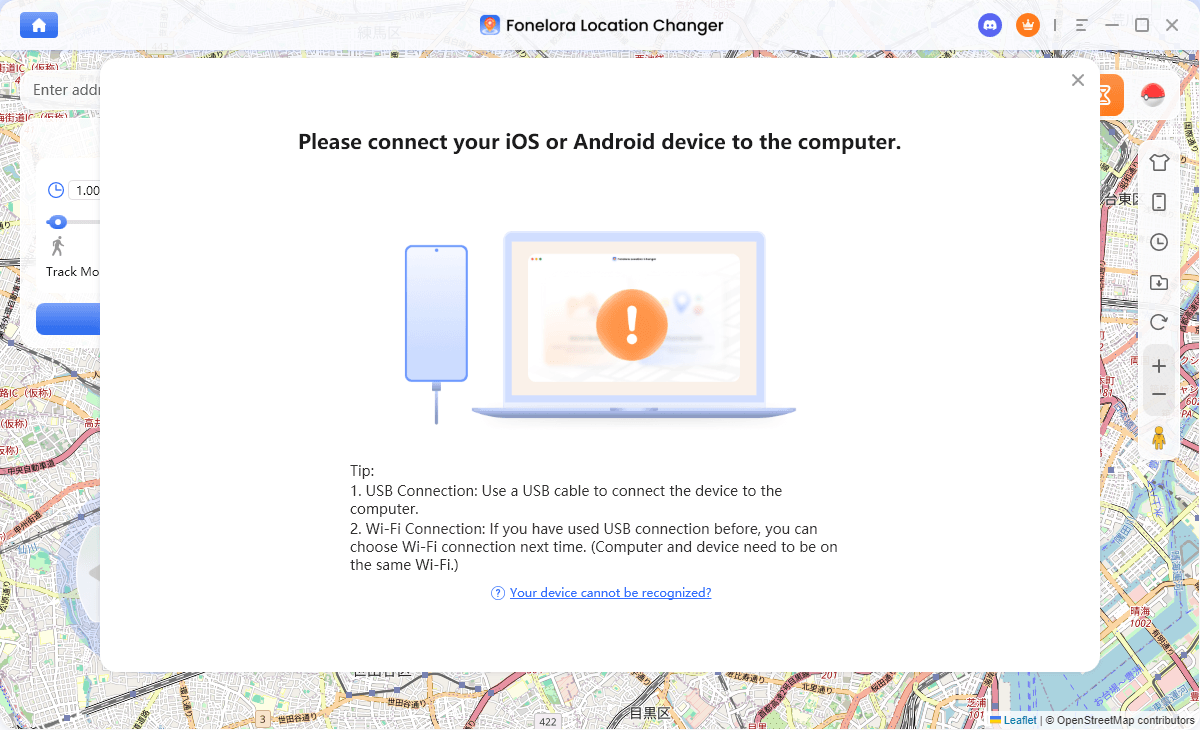
Connect with Your Devices
- Choose the Right Module: Select “Game Mode” if you are setting up for an LBS game.
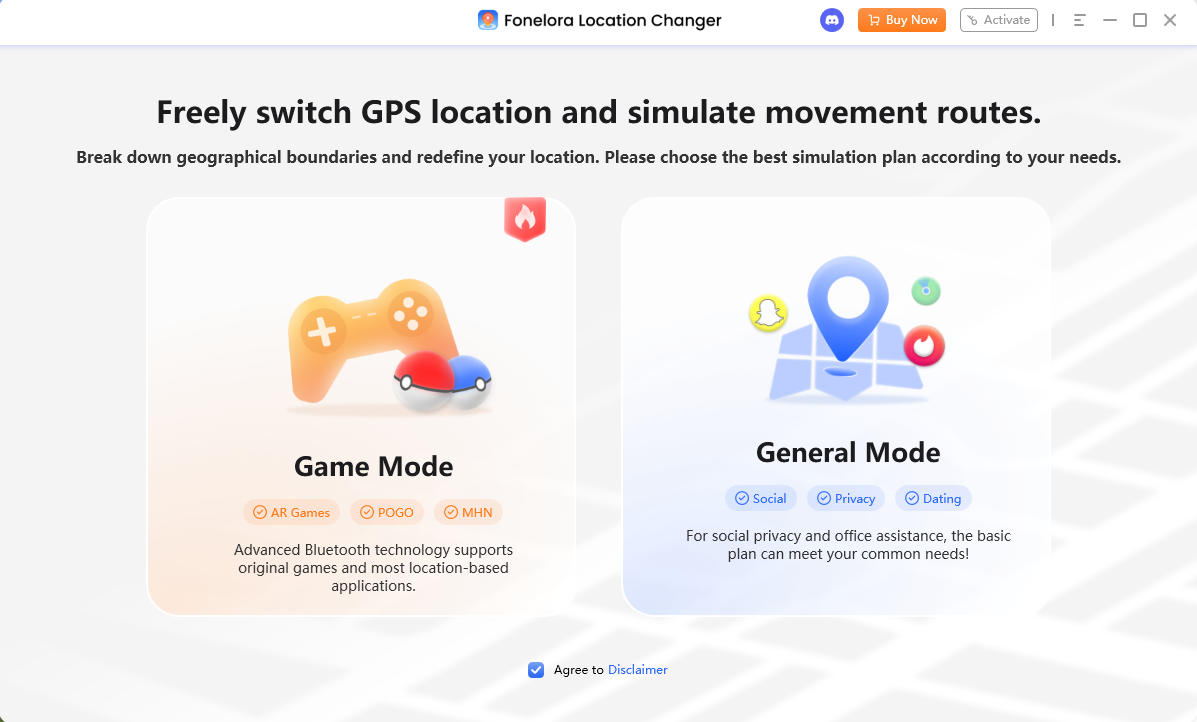
Choose a Mode
- Plan Your Route: Use Single-Spot or Multi-Spot mode to map a natural walking path instead of instantly teleporting.
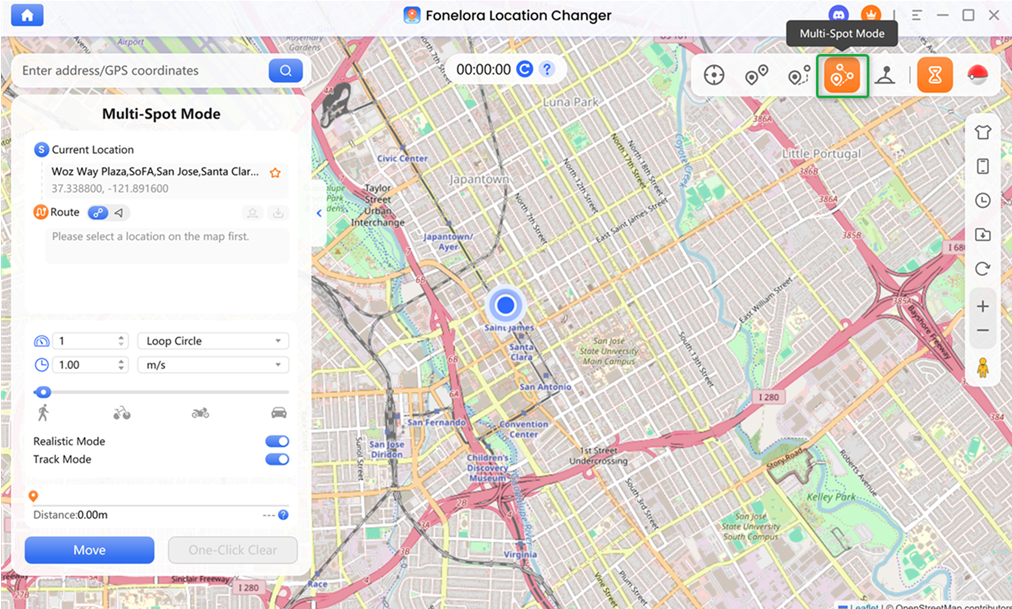
Multi-Spot Mode
- Enable Safety Features: Turn on Realistic Mode to simulate natural walking speeds. Most importantly, keep an eye on the built-in Cooldown Timer. After executing a long-distance jump, always check this timer and wait for the countdown to reach exactly zero before interacting with the game (e.g., catching a Pokémon or spinning a PokéStop).
- Start Moving: Execute your route while managing your in-game actions responsibly.
Frequently Asked Questions
Q1. Is it illegal to spoof your location?
No, changing your GPS location for gaming, entertainment, or personal privacy is generally legal. It only becomes illegal if used to commit fraud or track unowned devices without consent.
Q2. Is GPS spoofing safe in Pokémon GO?
Spoofing violates Niantic’s Terms of Service and always carries some account ban risk. To stay as safe as possible, you must carefully manage cooldown timers and avoid sketchy on-device apps.
Q3. Will I go to jail for changing my GPS?
No. Law enforcement is not concerned with users changing their location to play mobile games on their own devices.
Q4. How do I spoof my location without getting banned?
While no method is 100% ban-proof, you can heavily minimize risk by waiting out cooldown periods, simulating realistic walking speeds, and using guided desktop tools rather than free mobile apps.
Q5. Do I need to jailbreak or root my phone to spoof safely?
No. Modern desktop tools like Fonelora Location Changer allow you to change your location on supported iOS and Android devices without requiring risky jailbreaks or complicated rooting procedures.
Q6. What is a soft ban and how do I avoid it?
A soft ban is a temporary restriction triggered when a game detects an impossible jump in distance over a short time. You can avoid it by calculating jump distances and strictly adhering to cooldown rules.
Final Verdict: Managing Your Risk
So, what should you actually do if you want to change your location?
The verdict comes down to your personal risk tolerance. From a legal standpoint, spoofing your own device for gaming or privacy is completely fine. From an account safety standpoint, spoofing will always carry some level of risk because it breaks the game’s official Terms of Service.
If you decide that the benefits outweigh the account risks, understanding game mechanics is your best defense. Respect cooldown timers, never jump across the globe instantly, and stay far away from unstable, malware-ridden free mobile apps.
Instead, opt for a controlled desktop workflow. Tools like Fonelora Location Changer provide built-in cooldown management and realistic movement simulation, giving you a much safer, risk-aware way to manage your virtual location on supported devices.

Fonelora Location Changer
- 1-Click to change GPS location without jailbreak or root.
- Supports Pokémon GO, Tinder, WhatsApp, Snapchat, Life360, and more.
- Advanced simulation to bypass Error 12 and prevent soft bans effortlessly.
- Teleport or multi-spot routing with fully customizable speeds.
100% Clean & Safe
100% Clean & Safe

Join Our Discord Community
Join our Discord community to meet and chat with other LBS game players, stay on top of the latest game tips & tricks, and also get instant support from us.
Join Now