


What is GPS Spoofing? A Complete Guide to Virtual Location

At its most basic level, GPS spoofing is the act of manipulating a device’s GPS receiver so that it broadcasts or registers a fake location. When you spoof your GPS, your device tells its operating system and all installed apps that you are in a completely different physical place than you actually are.
While the term “spoofing” often sounds like a high-level cybersecurity threat involving hackers and satellites, everyday mobile virtual location concepts are much simpler. Modern consumer GPS spoofing does not involve broadcasting malicious radio signals to trick aviation or military equipment. Instead, everyday users simply rely on software to perform “OS-level mocking.” This means the software directly feeds alternative coordinates to the phone’s operating system, changing the location your device reports to maps, games, and social apps safely and privately. If you are exploring virtual location resources, understanding this core difference is the perfect starting point.
How Does GPS Spoofing Work? Hardware vs. Software
When people hear about GPS spoofing in the news, they are usually hearing about complex hardware attacks. However, when everyday users talk about spoofing their phone’s location, they are talking about software settings. Understanding the difference between these two methods is key to alleviating any anxiety about “hacking.”
Here is a clear breakdown of malicious hardware spoofing versus consumer software mocking:
| Feature | Hardware Spoofing (Malicious) | Software OS-Mocking (Consumer) |
|---|---|---|
| How it Works | Broadcasts fake radio frequencies to overpower legitimate satellite signals. | Uses developer settings or tethered software to feed fake coordinates to the phone’s OS. |
| Target Audience | Military, maritime, or aviation disruption. | Everyday smartphone users (gamers, privacy seekers). |
| Complexity | Requires expensive transmitters and technical expertise. | Requires basic software and a few clicks. |
| Impact Scope | Affects all GPS receivers in a wide physical radius. | Only affects the user’s personal, connected device. |
| Legality | Highly illegal and heavily regulated. | Generally legal for personal device management (though it may violate app TOS). |
Consumer tools do not involve illegal radio frequency hacking. They simply utilize existing developer pathways built into iOS and Android to test or simulate new locations.
GPS Spoofing vs. VPNs: Understanding the Difference
A common point of confusion is whether a Virtual Private Network (VPN) and a GPS spoofer do the same thing. While both tools are used for digital privacy and accessing geo-specific content, they operate on entirely different levels of your device.
A VPN works at the network level. It encrypts your internet traffic and routes it through a server in another location, changing your IP address. However, a VPN cannot change the physical satellite coordinates reported by your phone’s internal hardware.
A GPS Spoofer works at the hardware/OS level. It overrides the physical satellite data, changing your GPS coordinates.
If you use a map app, an AR game, or a dating app that strictly reads GPS satellite data, a VPN will not change your location. You need a GPS spoofer to alter those coordinates.
| Tool | What it Changes | How Apps See You | Best For |
|---|---|---|---|
| VPN | IP Address | Traffic appears to come from a different server location. | Browsing privacy, bypassing streaming geo-blocks, encrypting public Wi-Fi. |
| GPS Spoofer | GPS Coordinates | Phone reports physical presence at a specific latitude/longitude. | Location-based games (AR), dating apps, real-time map tracking privacy. |
Learn more about the GPS tracking app: How Do Phone GPS Tracking Apps Work?
Why Do Everyday Users Need Virtual Location Tools?
There are many legitimate reasons why someone might want to fake their phone’s location. Rather than malicious activity, consumer virtual location tools are typically used for privacy, entertainment, and app testing.
- LBS Games and AR Gaming: Players of location-based services (LBS) or Augmented Reality (AR) games often want to access regional events, catch geo-specific items, or simulate movement when physical travel isn’t possible (due to weather, mobility issues, or time constraints). Players regularly search for Pokémon GO spoofing resources to safely enhance their gameplay.
- Location Privacy: Many social media and location-sharing apps track users in real time. Spoofing allows users to freeze their location or appear somewhere else, protecting their daily routines and personal privacy without having to delete the app.
- Social and Dating Apps: Users frequently want to match with people or explore social feeds in different cities before they travel for work or vacation.
- Developer Testing: App developers need to test how their own location-based apps behave in different parts of the world without actually flying there.
While these use cases are highly common, mobile operating systems do not make this easy out of the box. Standalone mobile apps are often unstable or require complex technical workarounds, creating a workflow gap for everyday users who just want a safe, controlled way to manage their location.
Is GPS Spoofing Illegal or Risky?
When considering virtual location tools, it is important to separate legal definitions from third-party app rules.
Legality vs. Policy
Using consumer OS-level spoofing on your personal device is generally legal in most regions. It is simply a modification of your own device’s software. As established earlier, hardware signal jamming or broadcasting fake radio frequencies is highly illegal, but consumer software does not do this.
App Rules and TOS Violations
While changing your own phone’s location may be legal, it frequently violates the Terms of Service (TOS) of third-party apps. This is especially true for competitive LBS games. Developers of these games actively monitor for unnatural location jumps to maintain fair play.
Account Risk and Soft Bans
If you play location-based games, account safety is never guaranteed. If you jump from New York to Tokyo in two seconds, the game’s servers will flag the impossible travel time. This can result in “soft bans” (temporary restrictions on catching items or spinning stops) or permanent account strikes. For this reason, anyone utilizing a virtual location tool must understand Pokémon GO cooldown rules and avoid jumping long distances without waiting a realistic amount of travel time.
How to Safely Spoof Location on Mobile Devices
Because Apple and Google place strict limits on how GPS is handled, finding a safe way to spoof your location can be tricky. Unverified standalone mobile apps often fail, trigger app risk controls, or require you to drastically alter your phone’s security by jailbreaking (iOS) or rooting (Android).
A safer and more stable alternative is using a guided desktop-tethered iOS GPS spoofer and Android location tool like Fonelora Location Changer. Fonelora changes your OS-level GPS coordinates safely through a wired or wireless connection to your computer, requiring no jailbreak. It is designed to give you precise control over your virtual location, including realistic movement simulation and built-in cooldown timers to help manage LBS game safety.
Here is how the general workflow operates for supported devices:
- Connect Your Device: Open Fonelora Location Changer on your computer and connect your iPhone or Android. (Note: iOS may require enabling Developer Mode, while Android requires USB debugging or MTP mode).
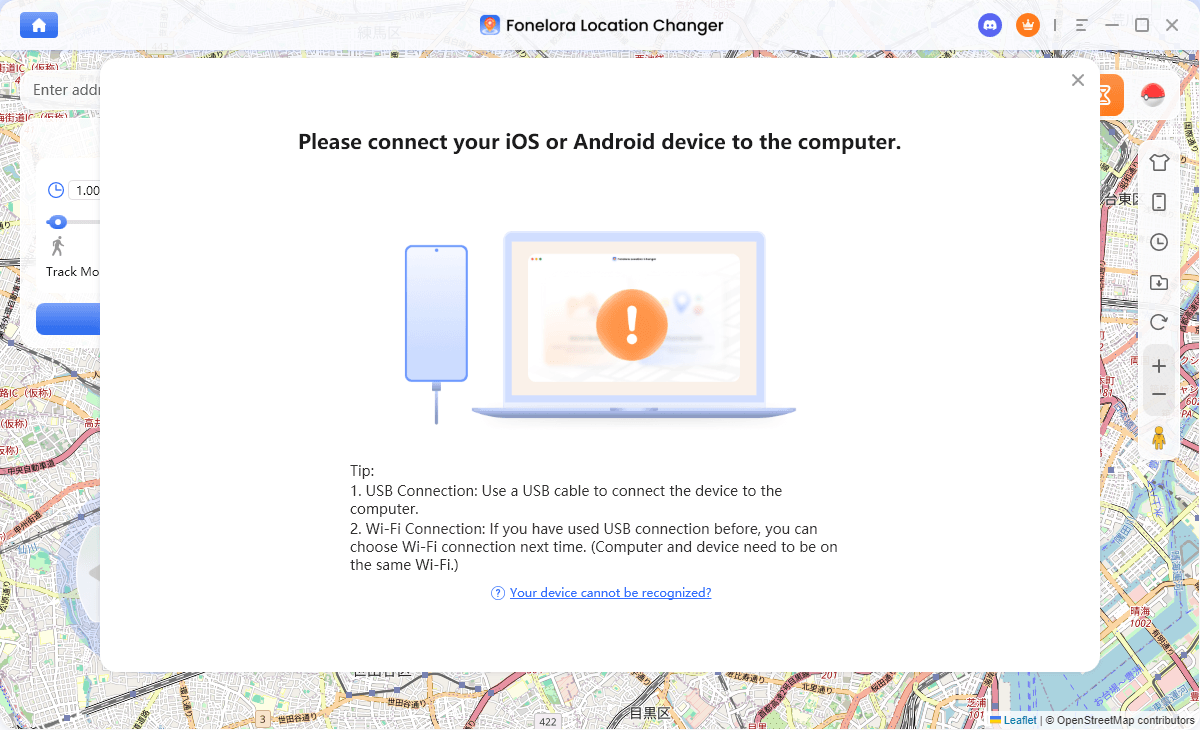
Connect with Your Devices
- Select Your Mode: Choose a movement mode based on your scenario. Use “Teleport Mode” for instant location changes, or “Joystick Mode” and “Multi-Spot Mode” for simulating natural walking routes.
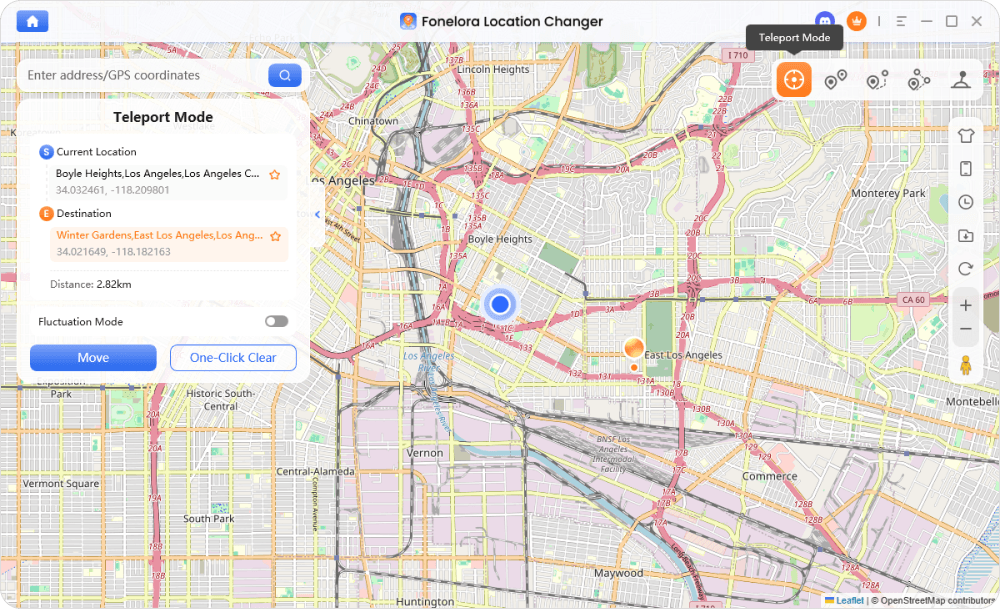
Teleport Mode
- Set the Destination: Enter the desired address or GPS coordinates into the search bar.
- Manage Cooldowns: If playing a game, check the built-in cooldown timer to ensure you wait the appropriate amount of time before executing a long-distance jump.
- Start Virtual Movement: Click to modify the location. Your device’s OS and all location-based apps will instantly read the new coordinates.
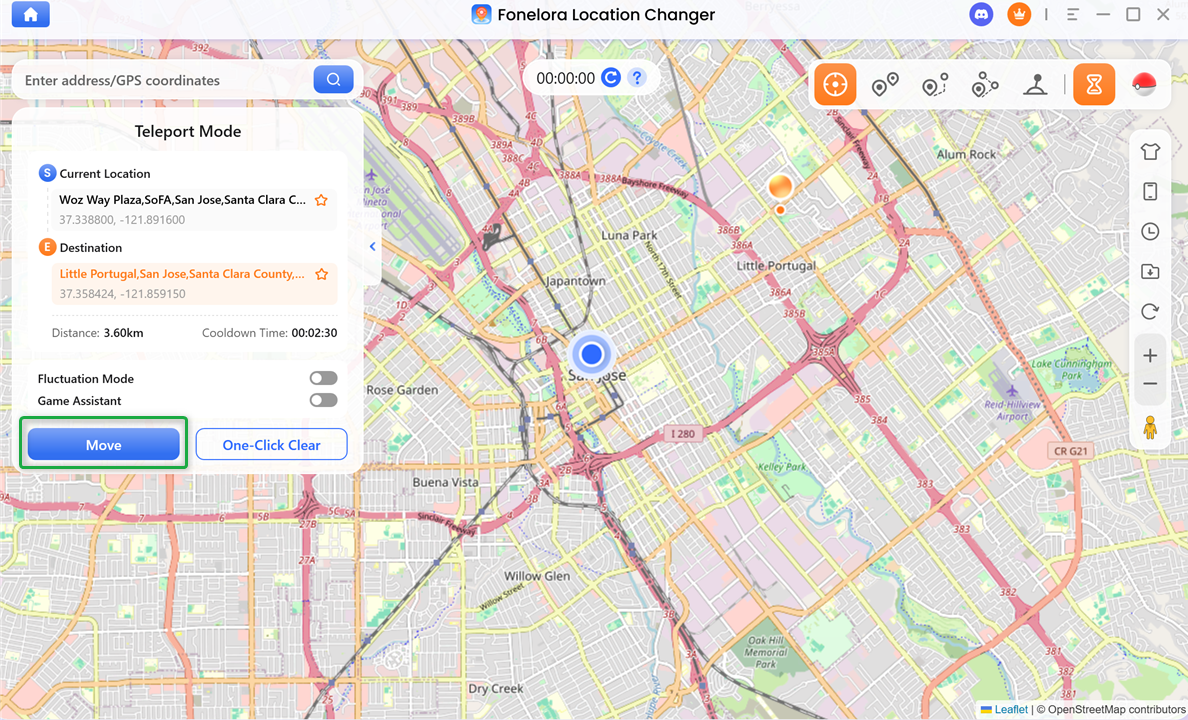
Click “Move”
Frequently Asked Questions About GPS Spoofing
Q1. What is the difference between GPS spoofing and GPS jamming?
GPS spoofing involves feeding fake location coordinates to a receiver so it thinks it is somewhere else. GPS jamming involves flooding an area with “noise” to completely block satellite signals, resulting in no location data at all. Jamming is always hardware-based and highly illegal.
Q2. Can GPS spoofing be detected?
Yes. While OS-level spoofing changes the data sent to apps, advanced server-side app checks can sometimes detect it. Apps may look for irregular movement speeds, impossible travel times without realistic cooldowns, or mismatches between your IP address and your GPS coordinates.
Q3. Is there a free way to spoof location?
Those looking for safe GPS spoofing on Android can sometimes use basic mock location apps paired with native Developer Options for free, though these often lack route simulation and are easily detected by games. iOS users have far fewer free options and usually require Apple’s official Xcode developer tools, which are highly technical to set up.
Q4. Do I need to jailbreak my phone for virtual location?
No. While older methods required jailbreaking, modern desktop-tethered tools like Fonelora Location Changer allow you to simulate location by communicating directly with the device’s developer channels, keeping your phone’s default security intact.
Final Thoughts on Mobile Location Management
Understanding what GPS spoofing is doesn’t have to involve complex cybersecurity manuals. For the everyday mobile user, consumer GPS spoofing is simply OS-level location mocking—a safe way to alter the physical coordinates your phone reports to its apps, distinctly different from a VPN that only masks your IP address.
While changing your location offers tremendous benefits for location privacy, social apps, and LBS gaming, it is vital to manage it responsibly. Always respect third-party app guidelines, be aware that no method guarantees zero account risk, and utilize cooldown timers to mimic natural movement behavior.
If you need a reliable way to manage your mobile device’s location without resorting to unstable mobile apps or risky jailbreaks, a guided desktop tool is often the best path forward. Fonelora Location Changer provides a secure, non-jailbreak workflow with adjustable speeds, route planning, and built-in cooldown reminders. To get started, check your device compatibility and download a free trial of Fonelora Location Changer to test your new virtual location today.

Fonelora Location Changer
- 1-Click to change GPS location without jailbreak or root.
- Supports Pokémon GO, Tinder, WhatsApp, Snapchat, Life360, and more.
- Advanced simulation to bypass Error 12 and prevent soft bans effortlessly.
- Teleport or multi-spot routing with fully customizable speeds.
100% Clean & Safe
100% Clean & Safe

Join Our Discord Community
Join our Discord community to meet and chat with other LBS game players, stay on top of the latest game tips & tricks, and also get instant support from us.
Join Now