


GPS vs Wi-Fi vs Cellular Location: What is the Difference?

When trying to understand how your smartphone knows exactly where you are, you will typically encounter three main tracking technologies: GPS, Wi-Fi, and Cellular. Whether you are trying to fix an inaccurate map pin or want to set up a stable virtual location, knowing how these methods differ is the first step.
Key Takeaways
- Smartphones use all three: Modern devices use “Fused Location Services,” automatically combining GPS, Wi-Fi, and Cellular data for maximum accuracy and battery efficiency.
- Environment matters: GPS is highly accurate outdoors (5 to 10 meters), while the Wi-Fi Positioning System (WPS) is the primary method your phone relies on indoors.
- The root of “rubber-banding”: Basic spoofing apps often fail because fake GPS coordinates conflict with real Wi-Fi background scans, causing your location pin to jump back and forth.
Here is a direct comparison of how iOS and Android smartphones use these three methods to calculate your location:
| Feature | GPS Location | Wi-Fi Positioning (WPS) | Cellular Location (Cell Towers) |
|---|---|---|---|
| Accuracy | 5 to 10 meters (Highly accurate) | 10 to 150 meters (Moderately accurate) | 600+ meters to several kilometers (Low accuracy) |
| Best Environment | Outdoors with a clear view of the sky | Indoors or dense urban areas | Broad areas; acts as a general fallback |
| Battery Usage | High (Requires active satellite reception) | Low to Medium (Scans local networks) | Low (Uses existing network connection) |
While GPS is the most famous method, your smartphone does not rely on it alone. Understanding how each method works individually will help you see why your device occasionally struggles to find you—or why it aggressively jumps back to your real location when exploring virtual location resources.
How Your Smartphone Tracks You: Breaking Down the Big Three
To understand why your location might drift indoors or behave unpredictably, it helps to look at the underlying technology behind each tracking method.
GPS (Global Positioning System)
Your smartphone has a built-in GPS chip that receives signals from a network of satellites orbiting the Earth. By calculating the time it takes for these signals to reach your phone, the device can pinpoint your exact coordinates. While GPS is highly accurate (often within 5 to 10 meters), its high-frequency signals are easily blocked by roofs, thick walls, and skyscrapers. This is why GPS struggles indoors.
GPS Location
Wi-Fi Positioning System (WPS)
Many users are confused by how Wi-Fi can track their location even when they are not connected to the internet. Your smartphone continuously scans the area for the unique MAC addresses (BSSIDs) of nearby Wi-Fi routers. It then cross-references these router addresses with massive, crowdsourced databases maintained by Apple and Google. Because routers rarely move, WPS can estimate your location within 10 to 150 meters, making it incredibly effective for indoor tracking where GPS fails.
Cellular Location (Cell Tower Triangulation)
When GPS is blocked and Wi-Fi data is unavailable, your phone relies on Cellular Location. By measuring the signal strength and distance between your phone and multiple nearby cell towers, network providers can estimate your general area through triangulation. This is the least accurate method, often placing you hundreds of meters or even kilometers away from your actual spot, but it serves as a reliable fallback when other methods fail.
The Secret to Pinpoint Accuracy: Fused Location Services
If you look at the settings on a modern iPhone or Android device, you will rarely see an option to use only GPS. That is because modern smartphone operating systems do not rely on a single method. Instead, Apple and Google use what is called “Fused Location Services.”
Fused Location Services automatically and continuously blend data from your GPS chip, nearby Wi-Fi networks, Bluetooth beacons, and cellular towers. By combining all these data streams, your phone achieves a faster “initial fix” when you open a map, maintains better accuracy as you move from outdoors to indoors, and optimizes battery life by leaning on lower-power Wi-Fi scans instead of battery-draining GPS.
While this fusion is brilliant for everyday navigation, it creates a massive headache for users trying to manage their location privacy or use virtual location apps.
Why Fused Location Causes “Rubber-Banding” When Spoofing
If you have ever tried to use a basic fake GPS app, you have likely experienced “rubber-banding.” This is the frustrating phenomenon where your location rapidly jumps back and forth between your chosen virtual location and your actual physical location in apps and games.
The User Scenario:
Imagine you are sitting in your living room and you use a basic mobile app to change your virtual location to a park across town. The app successfully overrides your phone’s GPS sensor. However, your phone’s Fused Location Services are still active. In the background, your device scans the Wi-Fi router in your living room and reports those coordinates to the operating system.
Your phone is now receiving two conflicting pieces of data: the fake GPS coordinates (the park) and the real physical Wi-Fi/Bluetooth data (your living room). The operating system gets confused and rapidly snaps your map pin back and forth between the two spots.
Basic mobile spoofing apps cannot override these built-in OS fused location protocols. To achieve a stable virtual location—whether you want to spoof location in Pokémon GO or use a reliable iOS GPS spoofer—you need a method that operates at the OS level and pairs with the correct manual hardware settings.
How to Change Location Reliably (Without the Jumping)
To stop rubber-banding and override your location securely, you need to resolve the hardware conflict caused by Fused Location. This requires a guided, OS-level tool like Fonelora Location Changer combined with a crucial manual troubleshooting step on your device.
Fonelora Location Changer provides a stable GPS override for supported iOS and Android devices via a desktop interface. However, it does not automatically disable Wi-Fi or Cellular tracking. You must manage those settings manually to ensure the Fused Location system does not fight the virtual coordinates.
Here is the workflow for a stable virtual location:
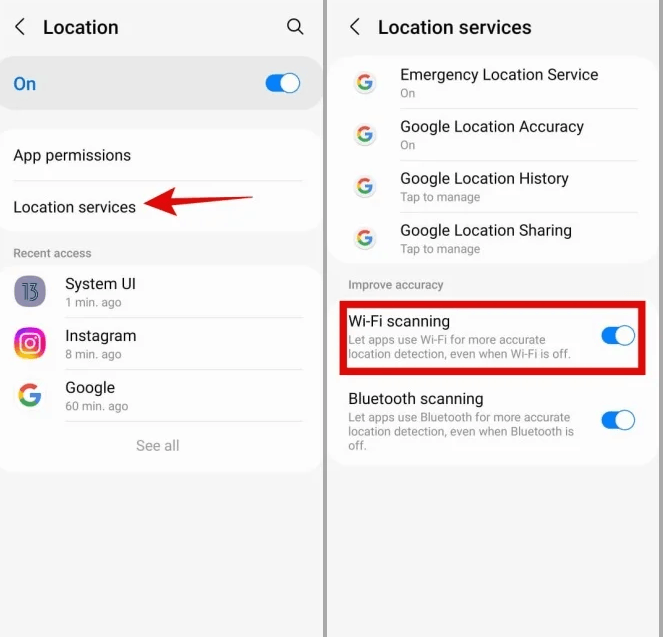
- Turn off background scanning (Mandatory Prerequisite): Before connecting to any virtual location tool, go to your phone’s settings. Turn off “Wi-Fi” and “Bluetooth” completely. On Android, go to Location Services and specifically disable “Wi-Fi scanning” and “Bluetooth scanning.”
Disable Wi-Fi Scanning
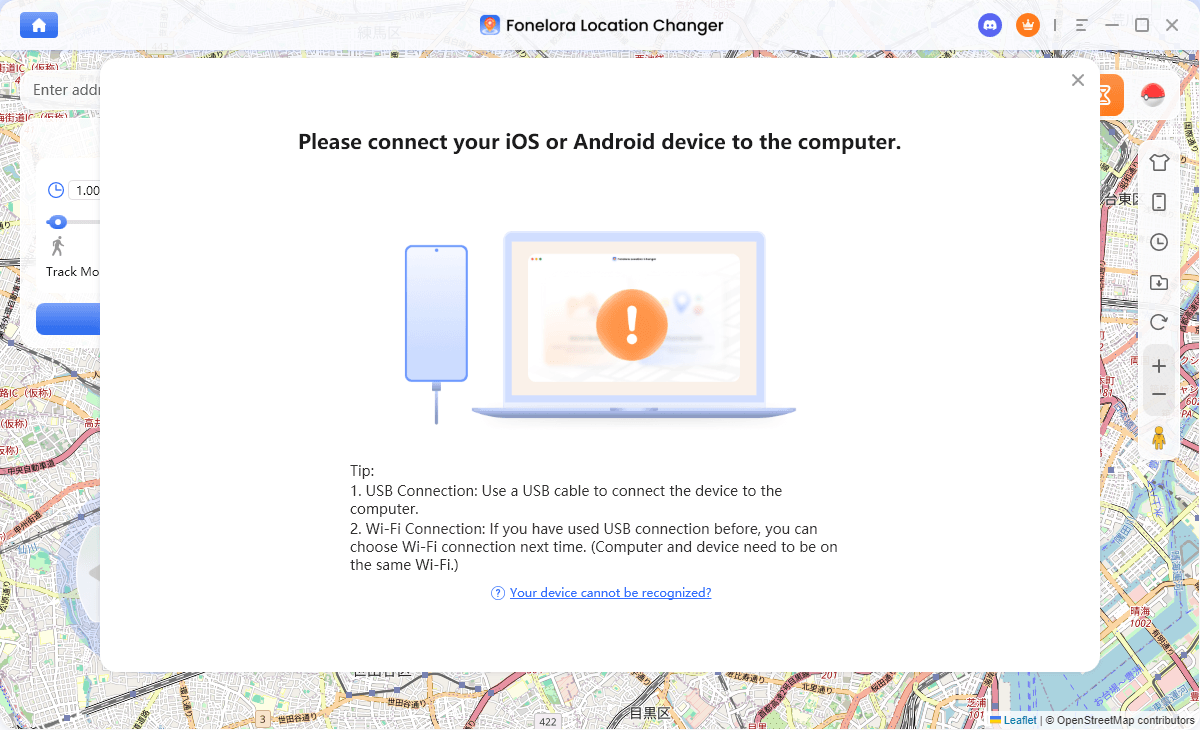
- Connect to the desktop tool: Open Fonelora Location Changer on your computer and connect your supported iPhone or Android device via USB or Wi-Fi.
Connect with Your Devices
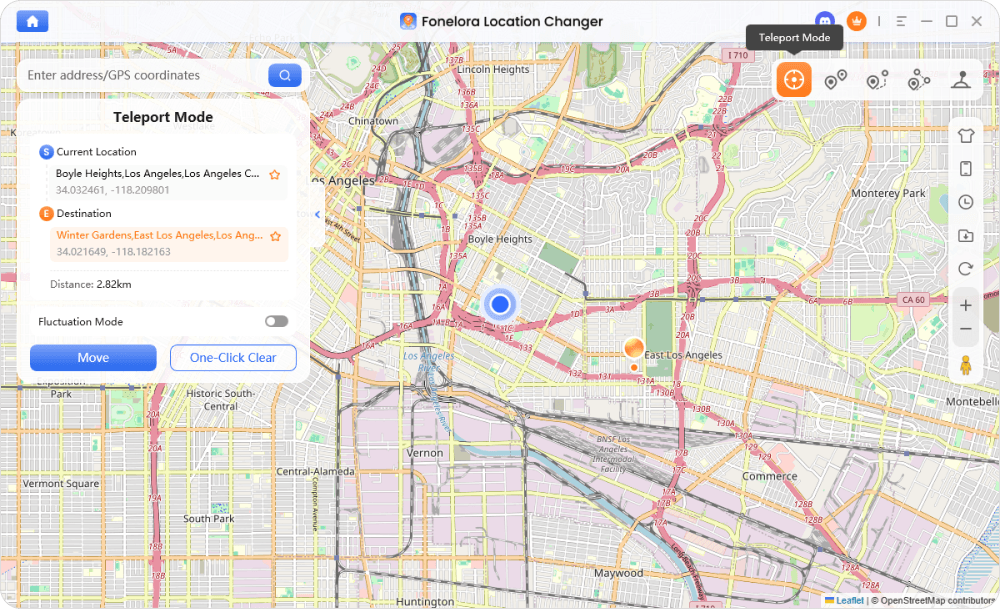
- Select your movement mode: Choose Teleport Mode to instantly change your GPS location, or use Joystick Mode for real-time directional control without setting a fixed destination first.
Teleport Mode
- Apply the virtual location: Start the override. Because your device is no longer reporting conflicting Wi-Fi router data to the OS, the new GPS coordinates will remain stable without jumping.
By treating background scanning as a necessary hardware checklist, you allow the OS-level changes provided by tools like Fonelora to work reliably. (If using Android, consider reviewing this safe GPS spoofing on Android guide to understand relevant developer options).
If you are struggling with unstable coordinates and want full control over your virtual movement without hardware conflicts, explore Fonelora Location Changer to set up a secure, OS-level override on your supported device.
Frequently Asked Questions
Q1. How does having Wi-Fi turned on improve location accuracy?
Turning on Wi-Fi allows your phone’s Fused Location Services to scan nearby router MAC addresses. This is especially helpful indoors where GPS signals from satellites are blocked.
Q2. Which location method is most accurate?
GPS is the most accurate method, typically placing you within 5 to 10 meters of your actual location, provided you are outdoors with a clear view of the sky.
Q3. Why does my location jump around when I am indoors?
When you are indoors, your phone loses its GPS signal and relies on Wi-Fi and cellular triangulation. If those signals fluctuate or if router databases are slightly outdated, your location pin will “drift” or jump around as the OS tries to guess your exact spot.
Q4. Does cellular data help GPS work faster?
Yes. Smartphones use Assisted GPS (A-GPS), which downloads satellite orbital data over your cellular network. This helps your GPS chip lock onto satellites much faster than it would on its own.
Q5. How does Wi-Fi know my location without being connected to the internet?
Your phone does not need to connect to a router to read its MAC address. Through the Wi-Fi Positioning System (WPS), your device simply “listens” to the broadcasted addresses of nearby routers and checks them against Apple or Google’s known location databases.
Q6. How do I stop my phone’s location from rubber-banding when using a virtual location app?
Rubber-banding happens when virtual GPS coordinates conflict with real Wi-Fi/Bluetooth background scans. To stop it, manually turn off Wi-Fi and Bluetooth scanning in your device settings, and use a stable, OS-level desktop tool like Fonelora Location Changer to manage the GPS override.
The Bottom Line: Taking Control of Your Smartphone Location
Understanding the difference between GPS, Wi-Fi, and Cellular location reveals exactly how your smartphone tracks you. Modern devices rely on a fusion of all three data sources to maximize accuracy and battery life. While this Fused Location system is excellent for daily navigation, it is the root cause of indoor map drift and the frustrating “rubber-banding” effect experienced when using virtual location apps.
Basic spoofing apps fail because they cannot stop your phone’s hardware from scanning nearby Wi-Fi routers. If you need a more reliable way to override your location without hardware conflicts, it requires the right tool paired with the correct manual settings.
By turning off background scanning and using a guided desktop solution, you can achieve a stable, OS-level location override on supported iOS and Android devices. This ensures you maintain full control over your virtual coordinates, route simulations, and app-visible location scenarios.

Fonelora Location Changer
- 1-Click to change GPS location without jailbreak or root.
- Supports Pokémon GO, Tinder, WhatsApp, Snapchat, Life360, and more.
- Advanced simulation to bypass Error 12 and prevent soft bans effortlessly.
- Teleport or multi-spot routing with fully customizable speeds.
100% Clean & Safe
100% Clean & Safe

Join Our Discord Community
Join our Discord community to meet and chat with other LBS game players, stay on top of the latest game tips & tricks, and also get instant support from us.
Join Now