


What is the Best Location Changer App in 2026?

What is the best location changer app right now?
Quick Answer: The most reliable “apps” for changing your GPS location without jailbreaking are actually desktop-assisted software. While standalone mobile apps are highly prone to crashing or triggering bans in location-based (LBS) games, desktop-tethered tools like Fonelora Location Changer provide a stable, seamless experience. When evaluating virtual location tools, prioritizing stability, gaming safety features, and ease of use over mobile-only convenience is the safest path forward.
Fonelora Location Changer
Mobile Apps vs. Desktop Software: Why Standalone Apps Often Fail
Why do mobile location apps crash or require jailbreak?
If you have spent any time searching the app store for a quick way to fake your GPS, you have likely run into frustration. Native iOS restrictions make standalone spoofing apps highly unstable. To get them to work smoothly on an iPhone, you are usually forced to jailbreak your device, which voids your warranty and compromises overall security.
Android users face a different but equally confusing struggle. While Android allows “Mock Locations” in Developer Options, basic mobile apps often lack the sophisticated movement simulation needed to fool modern applications. As a result, LBS games quickly detect these standalone mobile apps, resulting in soft bans or the dreaded “Error 12”. To ensure safe GPS spoofing on Android, users need a solution that feeds natural movement data rather than erratic, static jumps.
This is exactly why a desktop-tethered solution has become the practical standard. By connecting your phone to a computer, the software can feed stable, natural-looking GPS data to your device, maintaining system security while avoiding automated anti-cheat flags.
What to Look for in a Reliable Virtual Location Tool
How do you choose a safe and reliable location changer? Before downloading any software, use this checklist to evaluate whether the tool meets modern stability and safety standards:
- No jailbreak or rooting required: Essential for protecting your device’s warranty and internal security.
- Broad OS compatibility: Ensure the tool actively supports the latest iOS and Android versions when you need a fake location on iOS or Android.
- Movement flexibility: Look for software that offers Teleporting, multi-spot GPX routing, and GPS joystick controls, rather than just static location jumping.
- Safety and risk management: Crucial for gamers, the tool should include built-in cooldown timers to help you manage virtual movement responsibly and avoid soft bans.
- Stable connection methods: The tool should offer clear, reliable connection options, including USB, Wi-Fi, or Bluetooth depending on your device.
Top Location Changer Tools Compared
How do the top fake GPS apps and desktop tools compare?
When navigating the confusing virtual location market, the biggest deciding factor is the software’s architecture. Here is a neutral, criteria-based comparison of basic mobile apps versus guided iPhone virtual location tools:
| Evaluation Criteria | Basic Mobile Apps | Desktop-Assisted Software (e.g., Fonelora) |
|---|---|---|
| Stability | Low (Frequent crashes and GPS resets) | High (Continuous, tethered data feed) |
| Jailbreak/Root Required | Often required for advanced features | No jailbreak or root required |
| Gaming Safety | High risk of detection (Error 12, soft bans) | Lower risk (Includes realistic movement & cooldowns) |
| Movement Features | Basic static teleporting only | Joystick, multi-spot routing, GPX import |
| Setup Difficulty | Confusing on-device setup and settings | Guided on-screen desktop instructions |
As the matrix shows, while mobile apps appear more convenient, desktop-assisted tools consistently score higher on stability and safety features, making them the clearer next step for serious users.
Fonelora Location Changer: The Best Desktop-Assisted Option
What makes Fonelora Location Changer different or better?
For users frustrated by the “mobile app” gap, Fonelora Location Changer provides a guided desktop workflow that prioritizes safer, more controlled virtual movement on supported iOS and Android devices.
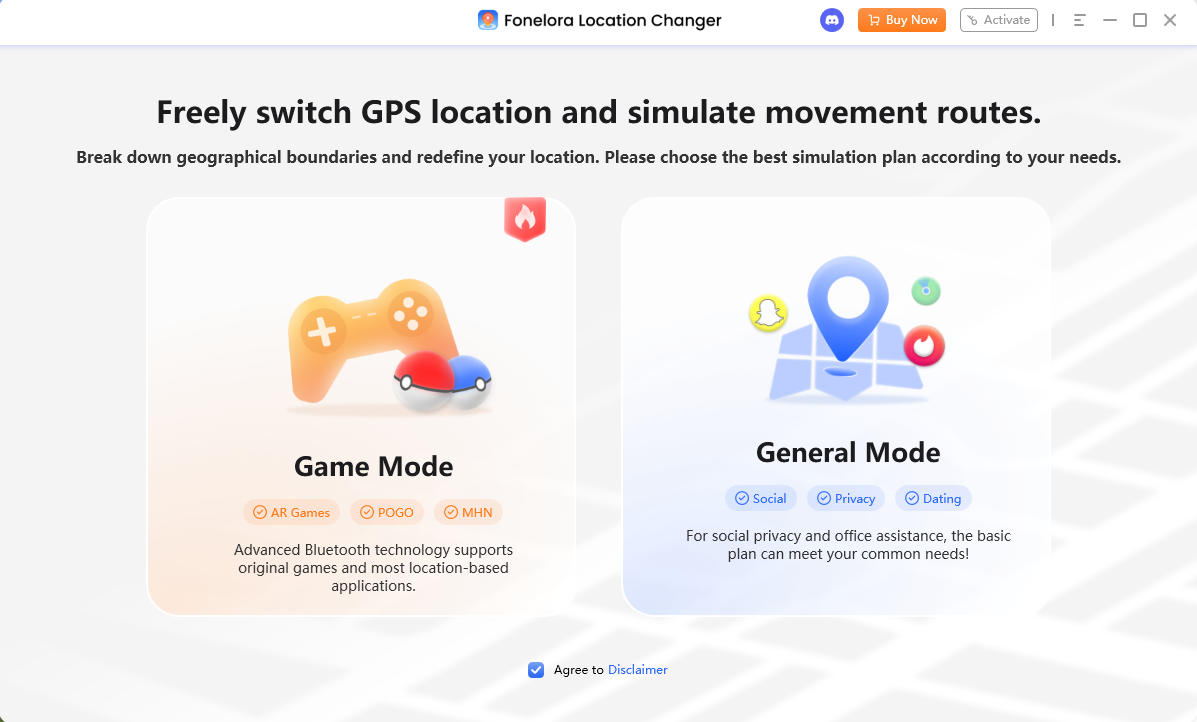
One of its standout features is the clear separation between Game Mode (optimized specifically for navigating LBS games responsibly) and General Mode (built for broader dating, privacy, and social apps). Instead of simply snapping your GPS to a new coordinate, it allows you to simulate natural movement.
Choose a Mode
Pros:
- No Jailbreak Required: Keeps your device and data fully secure.
- Advanced Movement Control: Features a GPS joystick, multi-spot GPX routing, and adjustable walking speeds for realistic movement.
- Built-in Cooldown Timer: Helps manage game-related movement by reminding you how long to wait before initiating long-distance jumps.
- Clear Mode Separation: Prevents mixing gaming setups with general privacy workflows.
Cons:
- Requires a Computer: You need a PC or Mac to connect your phone and initiate the workflow.
- Not 100% Risk-Free: While it includes robust safety features and cooldowns, no tool guarantees zero ban risk if you aggressively violate third-party app rules.
Change GPS Anywhere — Enjoy 100% native support for Pokémon GO (No Error 12), MHN, Snapchat, Tinder, and more—without any cracked versions or jailbreak.
How the Desktop-Assisted Workflow Actually Works
How hard is it to connect your phone to a computer to change your location?
One of the main benefits of using a desktop-assisted tool like Fonelora Location Changer is that the software automatically guides you through the intimidating technical steps. Here is how the workflow operates:
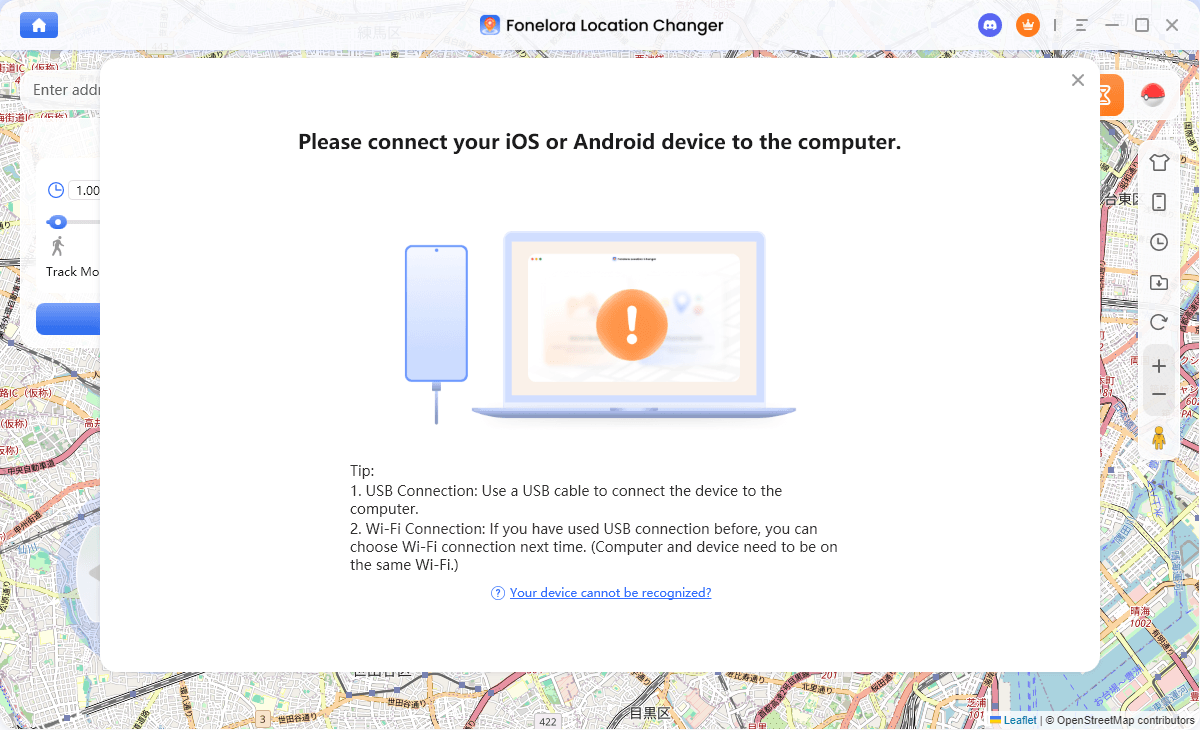
- Check Compatibility and Connect: First, verify your device is running a supported iOS or Android version. Then, launch the software on your PC or Mac and connect your device via USB or Wi-Fi.
Connect with Your Devices
- Follow the Guided Setup: The interface will prompt you to safely enable Developer Mode (for iOS) or USB Debugging (for Android), walking you through the native settings without technical guesswork.
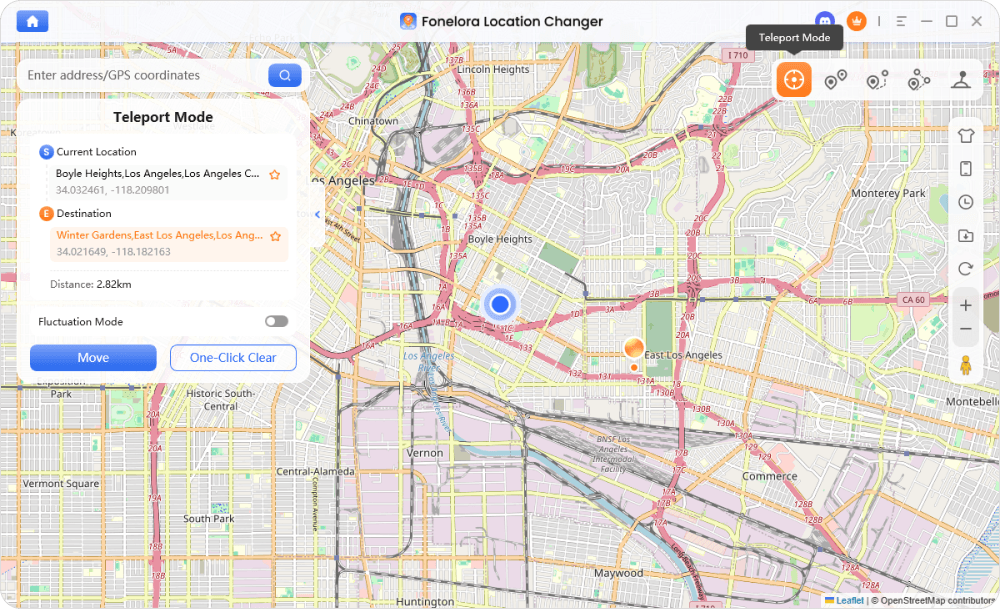
- Select Your Mode: Choose a movement mode based on your scenario, such as Teleport Mode for an instant location change, or Joystick Mode to navigate an area in real-time.
Teleport Mode
- Start Moving: Your device’s GPS location is updated system-wide, allowing your target apps to read the new coordinates naturally.
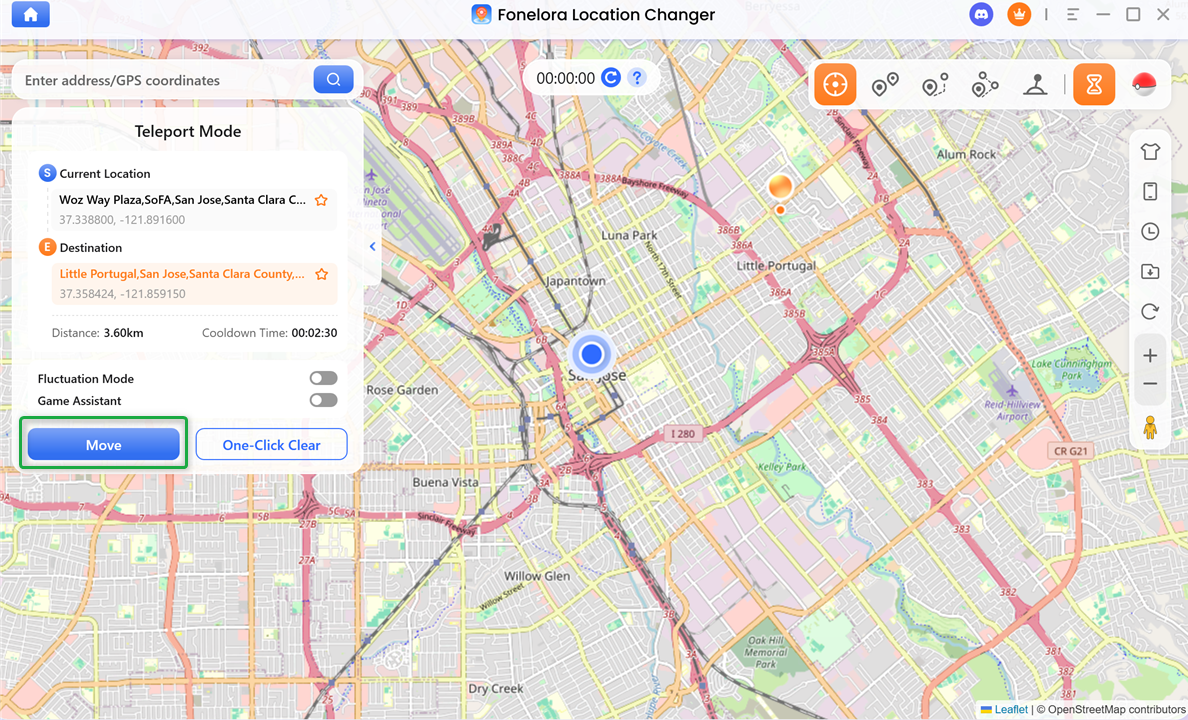
Click “Move”
By taking the confusion out of manual setups, desktop software transforms a difficult technical process into a few simple clicks.
Troubleshooting: Fixing Error 12 and Connection Issues
Even with a stable guided workflow, you may occasionally run into connection or game-related issues. Here is a quick troubleshooting flow to resolve common problems:
Symptom: Error 12 in LBS Games
- Likely Cause: Game developers frequently update their anti-cheat mechanisms to detect sudden location changes.
- Action: Ensure you are using Game Mode and operating under supported conditions. Always respect the cooldown timer when you change location in Pokémon GO or other AR games. While the timer serves as an essential reminder for safe movement distances, it does not guarantee absolute immunity from soft bans. Results may vary based on recent game updates.
Symptom: Device Not Recognized or Connection Drops
- Likely Cause: A faulty cable, loose port, or unrecognized device permissions.
- Action: Check your USB connection or switch to a stable Wi-Fi network. For Android, ensure USB Debugging is active and set to MTP mode. For iOS, verify that you have tapped “Trust This Computer” and properly enabled Developer Mode.
Symptom: GPS Suddenly Resets
- Likely Cause: The connection was interrupted during movement.
- Action: Keep your device connected throughout the session and avoid opening native mapping apps that force real-time GPS refreshes.
Frequently Asked Questions About Fake GPS Apps
Q1. Is there a free fake GPS app?
While free basic apps exist, they frequently suffer from intrusive ads, poor stability, and a high risk of triggering game bans. Premium desktop software provides a much more reliable experience, often offering limited free trials to verify compatibility.
Q2. Do I need to jailbreak or root my phone?
No. By utilizing a guided desktop software like Fonelora Location Changer, you can successfully change your location on supported iOS and Android devices without altering or compromising your operating system’s security.
Q3. Will using a location changer ban my account?
There is always an inherent risk when altering your location in LBS games. Using a tool with built-in cooldown timers and realistic movement helps manage and reduce this risk, but no tool on the market can honestly guarantee a completely zero-ban experience.
Q4. Does changing my location work on dating and social apps?
Yes. When using General Mode on tools like Fonelora, your virtual location is broadcast system-wide, allowing you to easily change Tinder location or adjust coordinates in privacy-focused applications.
Q5. Why do I need a computer to change my iPhone location?
Apple’s native iOS restrictions tightly lock down GPS data to protect users. A computer connection is necessary to safely feed developer-level GPS coordinates to the device without requiring a risky jailbreak.
Which Location Changer Tool Should You Choose?
What is the final verdict?
While searching for a standalone “mobile app” seems like the most convenient option, it usually leads to a frustrating cycle of app crashes, connection errors, game bans, or forced jailbreaks.
The reality of the modern virtual location market is that a guided desktop workflow provides the most stable, feature-rich, and natural movement simulation available today. For users who want safe, controlled virtual movement across iOS and Android without compromising their device’s underlying security, Fonelora Location Changer is our top recommendation.
Ready to upgrade your virtual location experience? Download or explore Fonelora Location Changer today to access versatile movement modes, built-in cooldown reminders, and seamless device connections.

Fonelora Location Changer
- 1-Click to change GPS location without jailbreak or root.
- Supports Pokémon GO, Tinder, WhatsApp, Snapchat, Life360, and more.
- Advanced simulation to bypass Error 12 and prevent soft bans effortlessly.
- Teleport or multi-spot routing with fully customizable speeds.
100% Clean & Safe
100% Clean & Safe

Join Our Discord Community
Join our Discord community to meet and chat with other LBS game players, stay on top of the latest game tips & tricks, and also get instant support from us.
Join Now